50 Conversions: A DTC Audit Playbook to Exit Facebook Ads Learning
If your ad set has been stuck in learning for more than a week, the problem is almost always volume, not creative or targeting. Check the delivery status first: if it says “Learning,” Meta just needs more data and the fix is usually to consolidate budget or temporarily switch to a higher-volume optimization event. If it says “Learning limited,” you have a structural problem that won’t resolve on its own, and you need to act within 24 hours. Either way, stop touching the ad set once you make a change.
TL;DR:
- Most stuck ad sets are caused by insufficient volume rather than creative or targeting issues, requiring a focus on budget and data accumulation.
- To exit learning, an ad set needs about 50 conversions per week, which often means increasing spend or consolidating similar ad sets.
- Fragmented audiences and mid-flight creative tests reset learning, so batch loads and no-change periods are crucial for stability.
- Tracking accuracy and pixel firing issues can artificially limit conversion data, making fixing technical problems a top priority.
- Using broader audiences, flexibility in bid strategies, and temporarily swapping optimization events can help reach the conversion threshold faster.
Table of Contents
- Six Fixes to Try When Your Facebook Ads Are Stuck in Learning
- How to Diagnose Why Your Ad Is Stuck in Learning
- Budget Math That Actually Predicts Whether You’ll Exit Learning
- Testing Creatives Without Fragmenting Your Learning Signal
- Fixing Tracking Problems That Cause Learning Limited Status
- When to Use Advanced Levers Like CBO, Bid Swaps, and Automation Rules
- A Short Monitoring Playbook to Avoid Repeat Resets
- My Audit Framework for Diagnosing Stuck Learning Phases
- Why Most Advice on This Topic Gets the Priority Order Backward
- Sources
- FAQ
Six Fixes to Try When Your Facebook Ads Are Stuck in Learning
Work through these in order. Most accounts stuck in the learning phase respond to the first two or three fixes, so don’t jump straight to a full rebuild before ruling out the simple stuff.
- Consolidate fragmented ad sets. If you’re running five ad sets each getting 8 to 10 conversions a week, merge them into one or two using campaign budget optimization (CBO) so Meta pools the signal instead of splitting it.
- Apply the budget floor or swap the optimization event. Calculate whether your daily budget can realistically produce enough conversions per week. If it can’t, either raise spend or temporarily optimize for Add to Cart instead of Purchase.
- Loosen bid and cost caps. A tight cost cap during learning restricts the auction just when you need Meta to explore freely. Switch to Lowest Cost (no cap) until the ad set exits learning, then reintroduce cost control.
- Batch your creatives at launch. Adding new ads mid-run resets learning for the entire ad set, according to Meta’s own Learning Phase documentation. Load everything you want to test before you hit publish.
- Verify your conversion tracking. A pixel misfire or a Conversion API gap can silently cut your usable event count in half, which is often the real reason an account looks “learning limited” when spend seems adequate.
- Set a no-touch calendar. Give the ad set 3 to 7 days of complete silence after any change. Practitioners consistently recommend this minimum window before judging results, a point echoed in AdMake AI’s breakdown of the 50-conversion threshold.
Pro Tip: Write your planned edits down before you touch the ad set. If you’re changing budget, creative, and audience in the same week, you won’t know which change actually fixed delivery, and you’ll have reset learning three times instead of once.
How to Diagnose Why Your Ad Is Stuck in Learning
Guessing wastes days. A five-minute audit tells you whether you’re dealing with a volume problem, a structural problem, a bid constraint, or a tracking gap, and each one has a different fix.
Start with the delivery status label itself, since Meta is explicit about what each one means. “Learning” means the ad set is actively gathering data and hasn’t yet hit the conversion threshold. “Learning limited” means Meta has flagged that the ad set is unlikely to gather enough data to exit learning at its current pace. “Active” means it exited learning and entered stable delivery. The distinction matters because “Learning” often resolves itself with patience, while “Learning limited” almost never does without a structural change.
Next, pull your conversion count for the trailing 7 days and compare it against the widely cited 50-events-per-week heuristic. This figure comes from Meta’s own guidance that ad sets need multiple optimization events in a rolling window to exit learning, and it’s been reinforced by agency data across dozens of documented accounts. If you’re at 12 conversions a week and your campaign objective is Purchase, no amount of patience fixes that. You need more volume, a cheaper optimization event, or fewer ad sets splitting the total.
From there, audit these four things in order:
- Audience size. An audience under roughly 500,000 people combined with a high budget can exhaust reach before it generates enough conversions, especially in narrow verticals.
- Spend per ad set per day. Compare actual daily spend against your target CPA. If daily spend is less than your CPA, you mathematically cannot generate one conversion a day, let alone seven a week.
- Creative count per ad set. One or two creatives per ad set limits how much variation Meta can test within your existing traffic, which slows signal accumulation even when budget is adequate.
- Auction Overlap and frequency. Rising frequency with flat or declining conversions inside Ads Manager’s delivery insights often signals the audience is too small for the spend level, not that the creative is failing.
Finally, check Events Manager for data quality. Open the Test Events tool and confirm your Purchase or Add to Cart event is firing with the parameters Meta expects, especially value and currency. Missing or duplicated events reduce your effective conversion count even when the campaign appears to be spending normally, and this is one of the most overlooked causes of a stuck ad set.
Once you’ve run through these checks, the decision usually becomes obvious. Low conversion count with adequate spend and multiple ad sets running the same audience: consolidate. Low conversion count with tight budget relative to CPA: raise the budget or switch the optimization event. Normal spend and normal event firing but flagged “learning limited”: you likely have an audience or bid constraint worth loosening before anything else. Broken or missing events in Test Events: fix tracking before touching budget or structure at all, because no amount of restructuring compensates for bad data.
Budget Math That Actually Predicts Whether You’ll Exit Learning
Most accounts stuck in learning aren’t underperforming creative. They’re underfunded relative to their own target CPA. The math is simple, and once you run it, the fix is usually obvious.
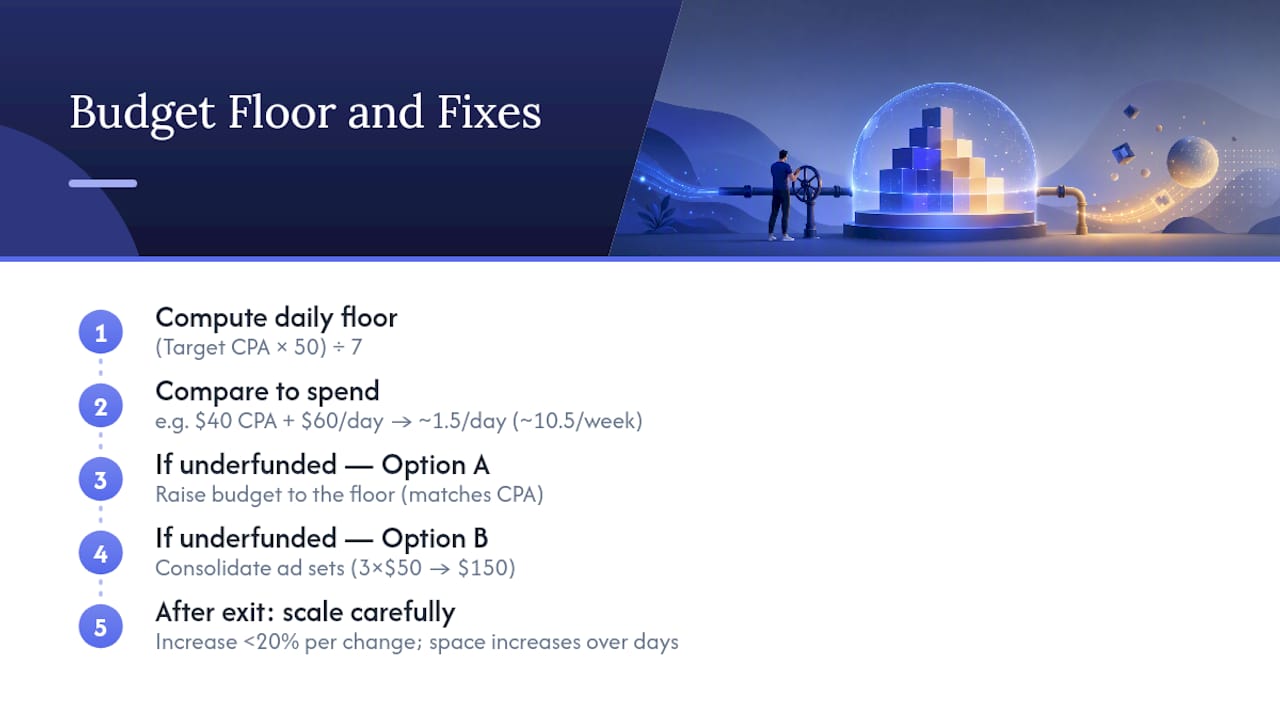
The working formula, used across agency audits and referenced in AdMake AI’s explainer on the 50-conversion threshold, is:
Daily budget floor = (Target CPA × 50) / 7
This assumes you need roughly 50 optimization events across a rolling 7-day window, split evenly across the week, and that your actual cost per result tracks close to your target. It’s a floor, not a guarantee. Auction competition, seasonality, and creative quality all still affect whether you hit that CPA in practice. Some accounts, particularly smaller or highly niche campaigns, have reported exiting learning with lower event counts than 50, so treat this as a planning number rather than a hard rule Meta enforces to the letter.
Here’s how the math plays out at different CPAs and budgets:
The pattern is consistent: a $50 daily budget cannot reliably exit learning at any of these CPAs. If your target CPA is $40 and you’re spending $60 a day, you’re generating roughly 1.5 conversions daily, or about 10.5 a week, well short of the 50-event benchmark. The ad set isn’t broken. It’s underfunded for its own cost target.
There are two ways to close that gap. The first is to raise the budget to match the floor, which isn’t realistic for every account. The second, more common fix, is consolidation: instead of running three ad sets at $50 a day each with the same audience, collapse them into one ad set at $150 a day. You haven’t increased total spend, but you’ve concentrated the signal so Meta can actually reach the threshold instead of splitting 30 weekly conversions across three ad sets that each individually look starved.
Pro Tip: Before consolidating, check whether your ad sets are even targeting distinct audiences. I’ve audited accounts running five “test” ad sets that were 90% audience overlap. That’s not testing. That’s dividing your own signal by five.
Once an ad set exits learning, resist the urge to scale aggressively. Increase budget in increments under 20% per change, and space those increases out over several days rather than doubling spend overnight, which risks tripping a new learning phase. My guide to scaling Facebook ads covers this pacing in more detail if you’re managing multiple accounts moving through this stage simultaneously.
Testing Creatives Without Fragmenting Your Learning Signal
Learning happens at the ad set level, not the individual ad level. That single fact explains why running one creative per ad set is one of the most common structural mistakes I see in audits. Splitting five creatives into five separate ad sets means each one needs to independently hit the conversion threshold, when combining them into one ad set lets all five share the same pool of signal.
Here’s the workflow that avoids that trap:
- Build 2 to 4 ad sets, each holding 6 or more creative variants. This gives Meta enough creative diversity within a single signal pool to find winners without diluting the data across too many separate learning processes.
- Load all creative variants before you launch. Adding a new ad to a live ad set restarts learning for the whole ad set, so front-load everything you plan to test rather than drip-feeding new creative in over the following weeks.
- Let creatives activate on a staggered schedule if needed, but don’t add new ones mid-flight. Staggered activation timing within the initial batch is fine. Adding fresh creative after the ad set has started gathering data is not.
- Once a clear winner emerges, duplicate it into a fresh ad set to scale it. Don’t just raise its budget inside the original test ad set. Scaling within the test ad set risks disturbing the very signal that made it a winner, and isolating it lets you push spend harder without contaminating your ongoing test.
- Refresh creative on a fixed cadence, not reactively. Agencies generally recommend refreshing the weakest performers every 2 to 3 weeks rather than swapping the whole set every time performance dips slightly, since frequent swaps mean frequent resets.
This structure, batch-launch, no mid-flight additions, isolate winners for scaling, is backed by agency creative-testing frameworks that consistently show 3 to 6 creatives per ad set producing more stable exits from learning than single-creative structures, as detailed in this breakdown of how the learning phase actually works. If you’re building this into a broader ecommerce testing calendar, my Meta Ads strategy guide walks through how to sequence creative batches across a full quarter.
Fixing Tracking Problems That Cause Learning Limited Status
A pixel that’s firing inconsistently or a Conversion API gap can make a healthy-spending ad set look like it’s starved for conversions, because Meta only counts events it can actually attribute. If your Events Manager shows fewer Purchase events than your backend order data, tracking is likely the real bottleneck, not budget or creative.
Start with these checks:
- Open Events Manager and run the Test Events tool to confirm your primary conversion event fires with the correct value and currency parameters on a live checkout.
- Compare pixel-only event counts against Conversion API event counts for the same date range. A large gap usually means one of the two integrations is misconfigured, and Meta’s deduplication logic depends on both sending matching event IDs.
- Check for deduplication errors in the Events Manager diagnostics panel. Duplicate events without matching event IDs get counted twice or dropped entirely, both of which distort your effective conversion count.
- Audit redirects and query-string stripping on your checkout flow. A redirect that drops UTM parameters or a query string that gets stripped by a caching layer can silently break attribution without throwing any visible error.
Server-side tracking through the Conversion API closes most of these gaps, since it sends events directly from your server rather than relying solely on browser-based pixel firing, which is increasingly unreliable due to ad blockers and browser privacy restrictions. If your in-house setup is inconsistent, a dedicated server-side tool like TrackAff can handle the CAPI implementation and deduplication logic directly, which removes a common point of failure in DIY setups.
Missing or deduplicated events reduce the usable optimization-event count that Meta relies on to exit learning, according to AdManage.ai’s analysis of learning phase mechanics, which is why tracking audits belong at the top of your troubleshooting list, not the bottom.
If a short-term fix is needed while engineering resolves a deeper integration issue, temporarily optimizing for a higher-funnel event like Add to Cart can generate enough signal to keep the ad set active while you wait. Route anything involving server code, tag manager containers, or API credentials to engineering. Marketing ops can usually handle Events Manager diagnostics and redirect checks without a developer.
When to Use Advanced Levers Like CBO, Bid Swaps, and Automation Rules
Once you’ve ruled out volume and tracking problems, a handful of more advanced levers can accelerate or protect an exit from learning, but each comes with a tradeoff worth understanding before you flip the switch.
- Lowest Cost vs. Cost Cap vs. Bid Cap. Lowest Cost gives Meta full freedom to chase volume, which speeds up learning but can raise your average CPA temporarily. Cost Cap constrains average cost but slows delivery. Bid Cap is the most restrictive and the most likely to stall an ad set in learning limited, so avoid it entirely until after exit.
- Temporary optimization-event swaps. Moving from Purchase to Add to Cart or Initiate Checkout can generate the volume needed to exit learning within days, then you swap back to Purchase once the ad set has stable delivery. Treat this as a planned, time-boxed experiment rather than a permanent change, and set a clear metric (usually cost per purchase after the swap back) that tells you whether it worked.
- CBO vs. ABO. Campaign budget optimization pools conversions across ad sets and speeds up learning when you’re running similar audiences. Ad set budget optimization still has a place for controlled experiments where you specifically need isolated, comparable data between two variables.
- Advantage+ audiences and placements. Broader targeting gives Meta more room to find your 50 weekly events without artificially constraining reach, which is one reason broad audiences tend to exit learning faster than narrow ones. My broad targeting guide for ecommerce covers the setup in more depth.
- Automation rules. Set a rule that alerts you (rather than auto-pausing) when spend, CPA, or frequency crosses a threshold, so a teammate doesn’t accidentally trigger a significant edit and reset learning without realizing it.
Pro Tip: If you swap optimization events, write the swap date on your team calendar along with the exact date you plan to swap back. Forgotten temporary swaps are one of the most common reasons accounts stay optimized for the wrong event for months.
A Short Monitoring Playbook to Avoid Repeat Resets
Getting an ad set out of learning once is easy compared to keeping it out. Most repeat resets I see in audits come from someone on the team making a small edit without realizing it restarts the clock.
- Track your rolling 7-day optimization-event count weekly, not just at launch. An ad set that exits learning can slip back if conversion volume drops due to seasonality or audience fatigue.
- Watch the cost-per-result trend line, not just the daily number. A single bad day is noise. Three consecutive days of rising cost per result alongside falling delivery is a signal worth investigating.
- Check the Last Significant Edit timestamp before assuming a performance dip is creative fatigue. If someone edited the audience or budget by more than roughly 20% recently, according to the industry-standard threshold for what resets learning, that’s your likely cause, not the ad itself.
- Set an alert for budget exhaustion or conversion shortfalls so you catch a stalling ad set within a day or two rather than discovering it a week later during a routine check.
- Enforce a written edit calendar with a 3 to 7 day batch window. Collect every proposed change (budget, creative, audience) and ship them together once, rather than making changes as they occur to you throughout the week.
- Require sign-off from one person before any significant edit goes live, even on small accounts. This single rule prevents more accidental resets than any dashboard I’ve built.
My Audit Framework for Diagnosing Stuck Learning Phases
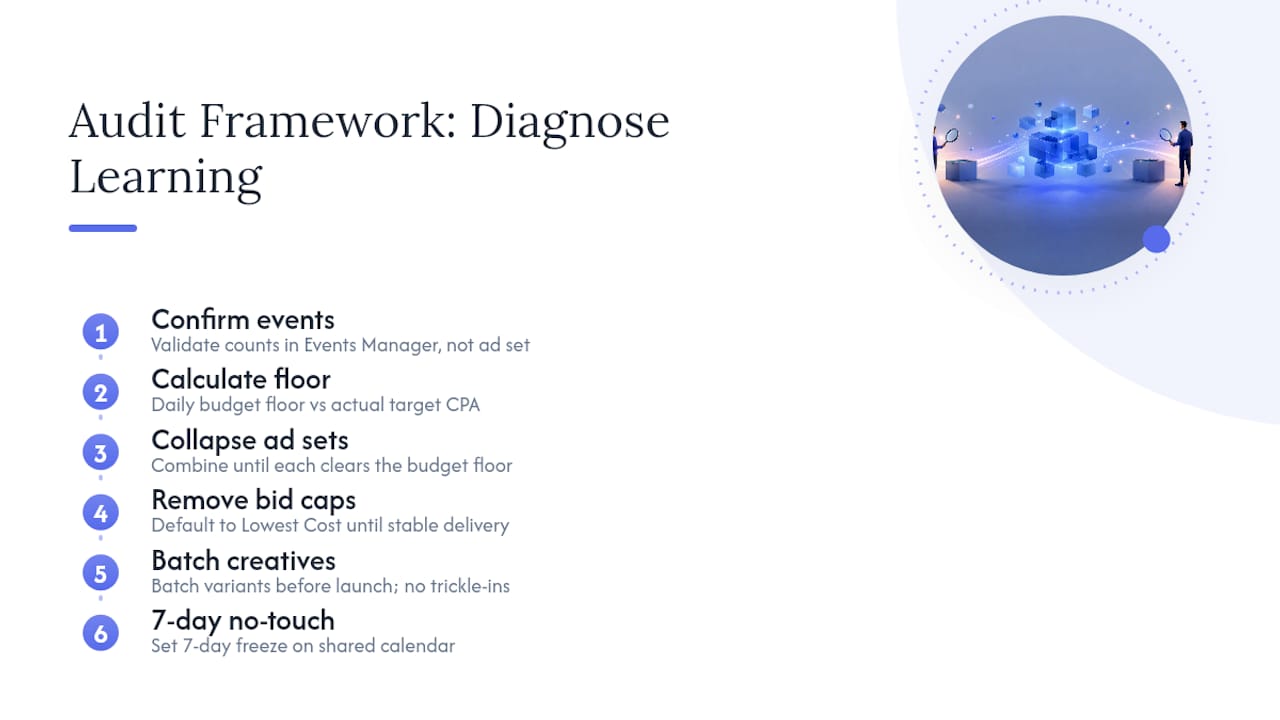
When I open an account that’s stuck, I run the same six-point audit every time, because guessing wastes both budget and the client’s patience. First, I confirm real event counts directly in Events Manager, not the number the ad set reports, since those two can diverge when tracking is unreliable. Second, I calculate the daily budget floor against the account’s actual target CPA. Third, I collapse ad sets until each one clears that floor, even if that means running fewer, larger tests than the team originally planned. Fourth, I remove bid caps and default to Lowest Cost until delivery stabilizes. Fifth, I batch every creative variant before relaunching, never trickling new ads in afterward. Sixth, I set a 7-day no-touch window and put it on the shared calendar so nobody touches the account out of anxiety on day three.
One anonymized pattern shows up constantly: an account running six ad sets at $40 a day each, all targeting nearly identical lookalike audiences, each stuck at 15 to 20 weekly conversions against a $50 target CPA. Collapsing those six ad sets into two, each now spending $120 a day, more than doubled the effective signal per ad set without increasing total budget. Within one no-touch cycle, both consolidated ad sets exited learning and delivery stabilized at a lower blended CPA than any of the original six had achieved individually.
At Cosma, we structure creative tests the same way across every ecommerce account we manage: batch the variants, isolate the audience overlap before launch, and never touch an ad set inside its no-touch window regardless of how the first two days look. That discipline, more than any single tactic, is what actually gets stuck accounts moving.
If your account has been stuck for more than two weeks and the fixes above haven’t moved it, that’s usually a sign the structural problem runs deeper than a single ad set, and it’s worth a full account audit. My team at Cosma runs this exact framework for DTC and ecommerce brands scaling Meta Ads in the US and Canada. You can see the kind of outcomes it produces in our case studies, browse creative examples in our portfolio, or book a call if you want a second set of eyes on your account this week.
Why Most Advice on This Topic Gets the Priority Order Backward
Most forum threads and even some agency blogs treat the learning phase like a creative problem. Swap the thumbnail, try a new hook, test another headline. In my experience running audits across dozens of ecommerce accounts, creative is rarely the first thing to fix. Volume is. An account that can’t mathematically reach 50 weekly conversions at its current budget and CPA will stay stuck no matter how good the ad looks, and no amount of creative testing changes that math.
The conventional advice also underrates consolidation because it feels counterintuitive to marketers trained to run more tests, not fewer. But fewer, better-funded ad sets consistently outperform a spray of thin ones. If I had to tell a stuck account one thing to prioritize this week, it’s this: calculate your budget floor before touching anything else. Fix tracking second. Consolidate third. Creative testing comes after the ad set has enough signal to actually learn from it, not before.
— Stefano Mazzei
Sources
Meta’s own documentation is the primary source for anything involving official policy, though it deliberately leaves some numeric thresholds unspecified, which is where practitioner data fills the gap.
- About the Learning Phase | Meta Business Help Center
- The Facebook Ads Learning Phase Explained: Why 50 Conversions Is The Magic Number | AdMake AI Blog
- Admanage
Each of these sources supports a different piece of this playbook: Meta for the official mechanics, and the two industry guides for the practical thresholds and fixes Meta doesn’t spell out explicitly.
FAQ
How long does a Facebook ad stay in learning?
There’s no fixed timeline. An ad set typically exits once it accumulates around 50 optimization events within a rolling 7-day window, so a well-funded ad set can exit in under a week while an underfunded one can stay stuck indefinitely without a structural fix.
Why is my ad still in the learning phase after a week?
The most common reason is insufficient conversion volume relative to your target CPA and budget, often caused by fragmented ad sets splitting the same audience or a budget that falls below the daily floor needed to hit 50 weekly events.
How do I fix learning limited Facebook ads?
Consolidate ad sets to pool conversions, raise your daily budget to clear the budget floor for your target CPA, or temporarily switch to a higher-volume optimization event like Add to Cart, then verify your pixel and Conversion API are firing correctly.
How long do ads stay in the learning phase if I keep making edits?
Every significant edit, including changes to audience, creative, optimization event, or a pause, restarts the learning phase from zero, which is why repeated edits can keep an ad set stuck indefinitely even when the underlying account has adequate budget.


