The Right Way to Run a Facebook Ads Audit in 2026
Start your facebook ads audit with signal, not spend: verify Pixel and Conversions API are both live and deduplicated, and check Event Match Quality before you trust a single ROAS number. If signal is broken, everything downstream, campaign structure, creative, budget, is a guess. The audit order that actually works is Signal → Structure → Creative → Measurement → Budget/Offer. Open Events Manager right now and check whether your Conversions API connection is receiving recent server events.
TL;DR:
- Ensuring Pixel and Conversions API are both firing, deduplicated, and providing recent data is critical, as broken measurement can mislead all subsequent decisions.
- Campaigns should focus on fewer, well-funded ad sets aligned with clear objectives, avoiding fragmentation or overlap that hampers learning and increases costs.
- Audience sizes for prospecting should be broad enough to allow efficient delivery, while retargeting audiences need to be tightly scoped and excludes recent buyers.
- Creative fatigue manifests as rising frequency and declining click-through and conversion rates, requiring regular refreshes with new concepts and optimized formats.
- Reconciliation between Ads Manager purchase data and backend orders must be performed weekly to identify attribution gaps, especially after changes like the removal of 28-day view windows.
Table of Contents
- What Does a Facebook Ads Audit Check First?
- Is Your Account Structure Built to Learn?
- Are Your Audiences Sized Right for Delivery?
- How Do You Know if Your Creative Has Gone Stale?
- Do Your Ads Manager Numbers Match Your Backend?
- Are Your Budget and Bidding Rules Protecting Delivery?
- Is the Landing Experience the Real Bottleneck?
- Which Audit Should You Run: 45 Minutes or 90?
- Printable Audit Checklist and Verdict Sheet
- How I Run Meta Ads Audits at Cosma
- What Most Audit Checklists Get Wrong
- Want a Second Set of Eyes on Your Account?
- Sources
- FAQ
What Does a Facebook Ads Audit Check First?
A proper Meta ads audit checks measurement integrity before it checks performance. That means confirming your Pixel and Conversions API are both firing, deduplicated, and current, because a broken server connection or a duplicate base code snippet can silently inflate or deflate your reported conversions for weeks before anyone notices. Multiple industry checklists converge on this as step one, and for good reason: you cannot judge creative fatigue, budget efficiency, or audience quality if the numbers feeding those judgments are wrong. A reliable audit framework treats signal as the gate you have to pass before anything else counts.
Here’s how to check it. Open Events Manager and look at your Pixel’s diagnostics tab first. You want to see events flowing in the last 24 to 48 hours, not a stale feed from three weeks ago. Then check your Conversions API connection separately. Meta shows both sources side by side, and if your CAPI events stopped a month ago while your browser Pixel kept firing, you’re now measuring on one leg instead of two, which usually means worse attribution and higher reported cost per acquisition than reality.

Deduplication is the part most teams skip. If your Pixel and your CAPI both send the same purchase event without a matching event_id, Meta can count it twice, and your reported conversions look better than your actual revenue. Check a sample of recent purchase events in the Test Events tool and confirm the event IDs match across both sources.
Event Match Quality (EMQ) is the score Meta assigns based on how much verified customer data (email, phone, external ID) accompanies each event. Practitioners generally treat a score of 8 or higher as strong, though this is an operational convention, not a number Meta publishes as an official standard. EMQ conventions like this are heuristics built from years of agency testing, not platform policy, so treat them as a directional target rather than gospel.
Common failure modes I see on almost every new account audit:
- Duplicate base Pixel code installed on the same page, double firing every event
- Server events with timestamps more than 48 hours old, which Meta may discount or ignore for optimization
- Consent management platforms blocking Pixel fires for a chunk of EU or California traffic without a compensating CAPI event
- Custom conversion events mapped to the wrong URL or button, counting the wrong action as a “purchase”
Pro Tip: If EMQ drops below 6 on your primary purchase event, stop scaling immediately. Fix the data layer first. Scaling budget on top of broken signal just means you’re paying more to learn the wrong lesson faster.
If your diagnostics show any of the failures above, the fix isn’t cosmetic. Pause aggressive scaling, get your CAPI implementation checked against Meta’s event schema, and re-verify before you spend another dollar chasing a ROAS number you can’t trust.
Is Your Account Structure Built to Learn?
A healthy Meta account in 2026 has fewer campaigns, not more. The days of building fifteen micro-campaigns to “test everything” work against you now, because Meta’s algorithm needs volume concentrated in fewer ad sets to exit the learning phase efficiently. Practitioners commonly use an operational benchmark for ad sets to generate enough optimization events per week to graduate out of Learning Limited status, and fragmentation below that threshold is one of the most common reasons accounts stall.
Auditing structure means asking three questions:
- How many active campaigns exist relative to monthly spend? If you’re running 20 campaigns on a $15,000 monthly budget, you’re almost certainly starving individual ad sets of the volume they need to learn.
- Does each campaign have a single clear objective? Mixing prospecting and retargeting logic inside one campaign muddies the signal Meta uses to optimize.
- Is there overlap between campaigns targeting the same audience? Two campaigns competing for the same person in an auction just raises your own costs.
A quick way to check consolidation: pull your campaign list sorted by spend over the last 30 days. If more than a handful of campaigns are spending under $50 a day, they’re probably too fragmented to ever leave learning, and consolidating them into fewer, better-funded ad sets usually improves both stability and cost.
Naming conventions matter more than people think during an audit, mostly because a messy naming system hides duplicate campaigns and orphaned tests that nobody remembers turning on. I look for a consistent pattern: objective, audience type, and launch date baked into every campaign name.
On Advantage+ versus manual control: Advantage+ Shopping Campaigns make sense when your Pixel and CAPI are solid and you have enough historical conversion volume to give the algorithm something to work with. Manual campaign structure still earns its place when you need granular control over placements, creative testing isolation, or a specific audience exclusion strategy Advantage+ won’t let you set. Neither is universally right. The signal quality you verified in the first audit step usually decides which one works for your account.
Are Your Audiences Sized Right for Delivery?
Audience sizing is where a lot of wasted spend hides in plain sight. An ad set targeting a custom audience of 8,000 people is almost never going to deliver efficiently, because Meta needs enough pool depth to find your buyers without burning through the same faces repeatedly. Watch for climbing frequency alongside flat or declining conversion volume. That combination usually means the audience ran dry.
For prospecting, broader is generally safer in 2026’s algorithm environment. Interest stacking and narrow demographic slicing tend to underperform letting Meta’s targeting engine work with a wider net and strong creative signal. For retargeting, the opposite logic applies: keep the window tight enough to stay relevant (7 to 14 days for site visitors is a common starting point) and exclude recent purchasers so you’re not paying to re-convince someone who already bought.
Audit checks worth running on every account:
- Pull audience size estimates for every active ad set and flag any that appear too small for cold prospecting or warm retargeting based on typical operational experience
- Check purchase-event exclusions on retargeting campaigns; if recent buyers aren’t excluded, you’re wasting impressions
- Review placement breakdowns in Ads Manager for any placement spending money with zero conversions over a two-week window
- Use Meta’s Audience Overlap tool inside Ads Manager to check whether two ad sets are competing for the same people
When overlap shows up above 20 to 30%, the fix is usually to merge the overlapping ad sets into one with a larger budget, exclude one audience from the other, or restructure so only one ad set targets that segment. Leaving both live just means you’re bidding against yourself in the same auction.
How Do You Know if Your Creative Has Gone Stale?
Creative fatigue has a specific signature: frequency climbs while click-through rate and conversion rate fall. That pattern means the same people are seeing your ad repeatedly and tuning it out, and that combination is the classic fatigue signal every experienced buyer learns to watch for. The audit question isn’t just “has this happened,” it’s “which creatives are burning the most budget while showing this pattern,” because that ranks your refresh priorities by actual dollar risk instead of gut feeling.
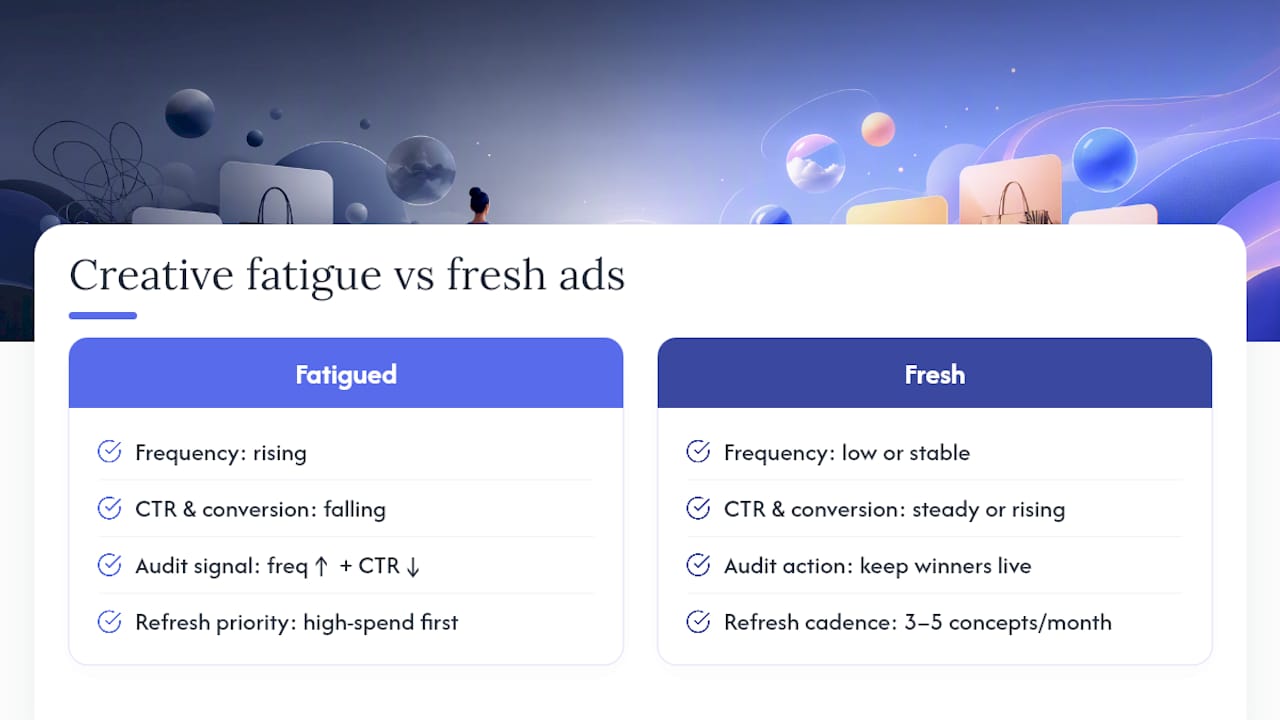
Pull a report sorted by spend over the last 14 days, then overlay frequency and CTR trend lines for each active ad. Ads showing rising frequency combined with a notable decline in CTR compared to early performance should be prioritized for refresh.
Format fit matters as much as fatigue. Vertical video built for Reels placement consistently outperforms repurposed square or landscape creative dropped into the same slot, mostly because the first three seconds have to hook attention in a native, scroll-stopping way rather than looking like an ad that wandered in from somewhere else. If your top creatives were shot horizontally for a website banner two years ago and never reformatted, that’s an audit finding worth flagging on its own.
On volume and cadence: I generally recommend staging 3 to 5 new creative concepts per active ad set per month, not because more is inherently better, but because a steady drip prevents the all-at-once fatigue cliff that happens when everything launched the same week burns out simultaneously. Keep your proven winners live even while testing new concepts. Pulling a winner too early to make room for a test often costs you the accumulated social proof (comments, shares, saves) that made it a winner in the first place.
Pro Tip: Resist the urge to edit a winning ad’s copy or thumbnail “just a little.” Even small edits can reset delivery and force the ad set back into a mini learning phase. If you want to test a variation, launch it as a new ad alongside the original instead of overwriting it.
Do Your Ads Manager Numbers Match Your Backend?
Reconciliation is the audit step most teams skip because it’s tedious, and it’s exactly the step that exposes whether your reported ROAS means anything. Pull your Ads Manager purchase count for a fixed date range and compare it against actual completed orders in Shopify, your ERP, or wherever revenue truth lives. A gap under 5 to 10% is generally normal and explained by attribution modeling. A gap wider than that should block any scaling decision until you understand why.
Run the reconciliation in this order:
- Pull Ads Manager purchases for a 7-day window using a consistent attribution setting.
- Pull backend orders for the same window, filtered to orders that can plausibly be attributed to paid social (use UTM tagging if you have it).
- Calculate the variance percentage and flag anything outside your acceptable threshold.
- Check for modeled conversions in Ads Manager, Meta increasingly fills attribution gaps with statistical modeling rather than pure observed data, and that modeled share matters for how much you trust the raw number.
- Document the gap and its likely cause (iOS attribution loss, cross-device purchases, coupon-code leakage to other channels) before adjusting budget.
A platform change that catches teams off guard: Meta removed the 7-day-view and 28-day-view attribution windows from the Ads Insights API on January 12, 2026. Any legacy dashboard or reporting script built around those windows may now be silently pulling wrong or empty data, which is exactly the kind of invisible break a quarterly audit is supposed to catch before it distorts three months of decision-making.
Build a simple reconciliation spreadsheet with columns for date range, Ads Manager purchases, backend orders, variance percentage, likely cause, and action taken. Run it weekly during active scaling and monthly otherwise.
Are Your Budget and Bidding Rules Protecting Delivery?
Budget concentration should scale with account size, not spread evenly across every idea you want to test. On accounts spending under $10,000 a month, I generally recommend concentrating 70% or more of budget in one or two proven campaigns rather than spreading it across five, because thin budgets rarely accumulate the optimization volume needed to exit learning.

Scaling itself needs guardrails. Step increases of roughly 20% or less, spaced a few days apart, tend to preserve delivery stability far better than doubling a budget overnight. Larger jumps commonly reset the learning phase, sending the ad set back into a volatile, expensive relearning period right when you wanted it to scale smoothly.
Quick checks worth running every week:
- Compare yesterday’s actual spend against the daily budget; consistent underspend of more than 15 to 20% signals a delivery or bid problem, not just a slow day
- Flag any ad set edited (budget, audience, creative) in the last 3 days and treat its data as unreliable until it stabilizes
- Review cost-cap and bid-cap settings on any underperforming ad set; caps set too aggressively low often throttle delivery entirely
- Check for campaigns still on manual bid strategies without a clear reason, since most accounts do better letting Meta’s automated bidding work with clean signal
Is the Landing Experience the Real Bottleneck?
Sometimes the ads are fine and the offer is the problem. Check message match first: does the headline, offer, and call-to-action on your landing page mirror what the ad promised? A mismatch kills conversion rate no matter how good your targeting is.
Mobile load speed matters more for Meta traffic than almost any other channel, since the overwhelming majority of clicks arrive on a phone straight out of the scroll. Anything loading slower than 3 seconds on mobile is costing you conversions you’re paying to generate.
- Confirm UTM parameters are consistent across every ad so reporting doesn’t fragment across “facebook / cpc” and “fb / paid” as separate sources
- Test your final URL destination directly from a phone, not just a desktop preview
- Check headline and CTA copy side by side, ad versus landing page, for literal consistency
Pro Tip: If CTR is healthy but conversion rate is flat across every campaign, stop auditing the ads. The problem almost always lives on the landing page or in the offer itself.
Which Audit Should You Run: 45 Minutes or 90?
Not every situation calls for the full audit. Match the pass to the moment.
Run the 45-minute pre-scale pass before increasing any budget: check Pixel/CAPI status and EMQ score (10 minutes), confirm reconciliation gap is under threshold (10 minutes), check frequency and CTR trend on top-spend creatives (15 minutes), verify no ad set was edited in the last 3 days (10 minutes).
Run the 60-minute recovery pass when performance has already dropped: start with signal verification, then check for missing purchase events specifically, then check for any creative with frequency above 4, then check recent account edits (a new pixel event, a changed bid strategy) that correlate with the drop.
Run the full 90-minute audit quarterly or during an account handover, covering every section in this guide in order: Signal → Structure → Creative → Measurement → Budget/Offer.
- Verify signal (Pixel, CAPI, EMQ, deduplication)
- Audit structure (campaign count, consolidation, learning-phase status)
- Review audiences and overlap
- Assess creative health and fatigue
- Reconcile Ads Manager against backend
- Check budget, bidding, and pacing
- Confirm landing page message match
Prioritize findings by downstream damage rather than by what’s easiest to fix. A broken measurement issue outranks a tired creative every time because bad signal corrupts every decision made on top of it. Build a simple verdict sheet with columns for finding, severity, owner, and due date, and assign every item before the audit meeting ends.
Printable Audit Checklist and Verdict Sheet
Run these in order, and treat any “block scale” item as a hard stop until fixed:
- Pixel firing on all key pages (block scale if broken)
- CAPI connected and sending events within 48 hours (block scale if stale)
- EMQ score of 8 or higher on primary purchase event
- Event deduplication confirmed via matching event IDs
- Campaign count reasonable for spend level (fewer, better-funded campaigns)
- Ad sets meeting roughly 50 optimization events per week
- No unresolved audience overlap above 20 to 30%
- Frequency under 3 to 4 on all active creatives
- At least 3 fresh creative concepts staged this month
- Ads Manager to backend reconciliation gap under 10%
- No unexplained budget pacing gaps over 15 to 20%
- Message match confirmed between top ads and landing pages
| Column | Purpose |
|---|---|
| Finding | What’s broken or at risk |
| Severity | Block scale, monitor, or minor |
| Owner | Who fixes it |
| ETA | Target resolution date |
| Status | Open, in progress, resolved |
How I Run Meta Ads Audits at Cosma
At Cosma, every audit I run starts with signal, always. We check Pixel and CAPI health and run a quick reconciliation between Ads Manager and backend orders before we look at a single campaign metric. The recurring failures we see across most new client accounts: measurement gaps nobody noticed, fragmented account structure from over-testing, and creative that’s been live untouched for months. We stage every fix, evidence first, then proposal, then implementation, so nothing gets changed live without a clear before-and-after read on impact.
What Most Audit Checklists Get Wrong
Most audit checklists I’ve seen treat every finding as equally urgent, which is exactly backward. A stale creative losing 15% efficiency and a broken CAPI connection lying about your entire revenue picture do not belong on the same priority level, yet plenty of “25-point checklists” list them side by side with no ranking logic attached.
The bigger blind spot is treating audits as a one-time event tied to a performance crisis. By the time ROAS visibly drops, the underlying signal problem or structural fragmentation has usually been compounding for weeks. A quarterly cadence, even when performance looks fine, catches the API changes and quiet data drift before they show up as a revenue problem.
I’d also push back on the instinct to fix creative first. It’s the most visible lever and the easiest to act on, so it gets the attention. Fix what you can trust before you fix what you can see.
— Stefano Mazzei
Want a Second Set of Eyes on Your Account?
Running this audit yourself will surface most of what’s broken. What it won’t always give you is the bandwidth to fix everything at once while still managing daily spend, which is where my team at Cosma comes in. We run full account audits for DTC and ecommerce brands scaling paid acquisition in the U.S. and Canada, then stage the fixes in priority order so nothing gets touched without a clear read on impact first.

The engagement typically starts with the same signal-first audit outlined here, then moves into structural cleanup, creative strategy, and a reconciliation system your team can run on its own going forward. You can see how this has played out for other ecommerce brands in our case studies, or look through examples of the creative work behind those results in our portfolio. If your account needs a prioritized fix plan instead of another generic checklist, book a call with my team and we’ll walk through what’s actually holding your ROAS back.
Sources
For readers who want to verify specifics or explore tooling, these are worth a look: the 2026 Facebook ads audit checklist covering signal-first frameworks, Capconvert’s account audit breakdown on learning-phase thresholds and API changes, the 5-layer audit checklist on prioritization logic, and historical benchmark data from WordStream for baseline CTR and CPC comparisons.
- Facebook Ads Audit: The Complete 2026 Checklist (+ Free AI Audit) — Adspirer Blog
- Auditing a Meta Ads Account | Capconvert
- Admanage
FAQ
How Much Do Facebook Ads Cost Per 1,000 Views?
Cost per thousand impressions (CPM) varies widely by industry, audience, and season, so compare your own CPM against your account’s historical baseline rather than a single industry-wide number.
How Much Does a Social Media Audit Cost?
Costs range from free self-audits using this kind of checklist to paid agency engagements that can run into the thousands depending on account size and scope; the value comes from catching measurement and structural issues before they compound.
Is $10 a Day Enough for Facebook Ads?
Ten dollars a day rarely generates enough weekly conversion volume for an ad set to exit the learning phase efficiently, especially against the roughly 50 weekly optimization events practitioners use as a benchmark, so treat small budgets as a signal-gathering phase rather than a scaling test.
Are Facebook Ads Worth It in 2026?
Facebook ads remain worth it for most ecommerce and DTC brands when signal is clean and structure is consolidated. My team at Cosma sees consistent results for brands that audit measurement first, since broken tracking is the most common reason paid social looks unprofitable when the underlying product and offer are actually fine.
How Often Should I Audit My Facebook Ad Account?
Run a lightweight signal and creative check before any major scaling decision, a recovery pass whenever performance drops unexpectedly, and a full structural audit quarterly or during any account handover.