Recover Missing Conversions: 5 Step Server Side Tracking for Ecommerce
Recover Missing Conversions: 5 Step Server Side Tracking for Ecommerce
Server-side tracking moves your conversion data from the browser to a server you control before it reaches Meta, Google, or any other ad platform. For ecommerce brands losing signal to ad blockers and iOS privacy restrictions, it is the single most reliable fix available today. My recommendation: run your browser pixel and server-side Meta Conversions API together, and deduplicate every event with a shared event_id.
TL;DR:
- Using server-side tracking significantly increases conversion data accuracy by bypassing ad blockers and browser restrictions, especially on iOS devices.
- Proper implementation requires manual capture of signals like referrer, UTM parameters, and original IP addresses to ensure data matches and deduplication.
- Starting with native platform integrations, like Shopify’s CAPI toggle, is recommended before progressing to server-side GTM or direct API calls for more complex multi-platform setups.
- Each event must have a consistent event ID generated from your source of truth, such as order ID, to prevent double counting and maintain high event match quality.
- Regular testing, monitoring, and validation of event data in tools like Meta’s Test Events are essential to prevent silent data loss and optimize measurement accuracy.
Table of Contents
- What Is Server-Side Tracking and How Does It Work?
- Why Ecommerce Advertisers Care About Server-Side Data
- Server-Side GTM, Meta CAPI, or Direct API: Which Implementation Fits?
- The Practical Checklist for Launching Server-Side Tracking
- Common Pitfalls (and the Fixes That Actually Work)
- What I’ve Learned Implementing This Across Dozens of DTC Accounts
- Should You Implement Server-Side Tracking Now?
- How Cosma Handles CAPI and Server-Side GTM for Ecommerce Brands
- Sources
- FAQ
What Is Server-Side Tracking and How Does It Work?
Client-side tracking fires straight from the visitor’s browser to the ad platform. The browser reads a page, and a pixel sends that event directly to Meta or Google. Server-side tracking inserts a stop in between: the browser sends the event to a server you own first, that server processes and enriches the data, then it forwards the event to the destination platform.

Google Tag Manager’s server-side option runs this through what Google calls a server container, a piece of infrastructure you control (often on Google Cloud) that receives requests from “clients.” A client, in this context, is a small piece of logic inside the container that interprets incoming device requests and turns them into structured events the container can route onward. Think of it as a translator sitting between your storefront and every destination you send data to.
This shift creates a catch marketers often miss: the browser normally sends contextual signals automatically, and none of that happens for free once you route through your own server.
document.referrerand UTM parameters do not travel automatically. You need to capture and forward them manually.- The visitor’s original IP address and user agent get replaced by your server’s own values unless you explicitly proxy them.
- Session and device signals that platforms use for matching require deliberate mapping, not assumption.
Mixpanel’s server-side documentation is blunt about this: skipping that manual capture step is the most common reason server-side setups underperform expectations.
Why Ecommerce Advertisers Care About Server-Side Data
The business case is straightforward: you recover conversions that never should have gone missing in the first place. Safari’s Intelligent Tracking Prevention, ad blockers, and iOS-level restrictions all interfere with browser pixels. Routing events through your server bypasses much of that interference, which Tealium notes improves both data reliability and site performance since fewer third-party scripts load in the browser.
The gains show up in a few concrete places:
- More complete conversion counts. Events blocked client-side often still land server-side, closing the gap between what your ad platform reports and what your order management system shows.
- Faster page loads. Fewer third-party tags running in the browser means less script weight and fewer render-blocking calls.
- Centralized consent enforcement. You decide, in one place, whether an identifier gets forwarded, rather than relying on dozens of scattered browser scripts to respect a visitor’s choice.
- Longer-lived first-party cookies. Server-set cookies typically survive longer than what browser restrictions now allow for third-party or even first-party JavaScript cookies.
Pro Tip: Don’t treat server-side tracking as a replacement for your pixel. Meta explicitly recommends running both simultaneously and deduplicating, since each leg catches signal the other misses.
Server-Side GTM, Meta CAPI, or Direct API: Which Implementation Fits?
Not every store needs the same setup. The right method depends on your platform, your engineering resources, and how many destinations you need to feed.
- Native platform integration (Shopify’s CAPI toggle). If you run Shopify, this is the fastest path to real gains. It is a built-in setting that forwards purchase and key funnel events to Meta’s Conversions API without touching code. For most single-platform ecommerce brands, this alone closes a meaningful chunk of the tracking gap Mako Metrics describes between native setups and custom builds.
- Server-side Google Tag Manager. Once you need to route events to more than one destination (Meta, Google Ads, TikTok, a CRM), or fire custom events your ecommerce platform doesn’t natively support, sGTM becomes worth the setup cost. You get one container managing multiple outbound connections instead of stitching together separate integrations.
- Direct server-to-server API calls. This is the heaviest lift, but it is also the only option when you need to send offline conversions, CRM-sourced leads, or post-purchase events (returns, refunds, LTV updates) that never touch a browser at all.
- Hosted CAPI gateways (Stape and similar third parties). These sit between full DIY sGTM and the native toggle, handling server hosting and maintenance for a monthly fee. You trade some control and a recurring cost for a much shorter setup timeline.
Most ecommerce brands should follow that order: start native, then earn your way up to sGTM or direct API only when the complexity is justified by a real destination or data need, an approach Mako Metrics’ setup guide also lays out as the practical default.
The Practical Checklist for Launching Server-Side Tracking
Getting server-side tracking live is one thing. Getting it accurate is another. Five items separate a clean launch from a data mess:
- Map every event field and standardize naming. Decide on exact
event_namecasing (Purchase, not purchase or PURCHASE) before you write a single line of server logic, since mismatched casing breaks deduplication silently. - Attach a shared
event_idto both legs. Generate it once, at the source of truth, typically the order ID from your ecommerce platform, and send that same identifier on the browser pixel event and the server event. - Capture and forward hashed identifiers plus original headers. Email and phone should be hashed before sending; IP address and user agent must be the visitor’s original values, proxied through, not your server’s own.
- Tie server-side event forwarding to consent state. Your server logic needs to check the same consent signal your CMP captured, before it forwards any identifier downstream.
- Verify in Test Events and track match quality. Confirm events appear correctly in Meta’s Test Events, then watch Event Match Quality against your backend order counts over time.
The setups that fail almost always skip the same step: someone assumes the server event and pixel event will naturally line up. They won’t, unless the
event_idis deterministic and pulled from the same source on both legs.
Common Pitfalls (and the Fixes That Actually Work)
Most server-side tracking problems trace back to a handful of repeatable mistakes.
- Sending your server’s IP and user agent instead of the visitor’s. This is the single most common error I see, and it quietly tanks match quality without throwing any obvious error.
- Generating separate, random event IDs for the pixel and server events. Deduplication depends on matching
event_id,event_name, and a closeevent_time; a mismatch here means double counting shows up in your ad dashboard, inflating reported conversions. - Launching without checking Test Events first. Skipping verification means you find out about a broken integration from a revenue discrepancy weeks later, not from a dashboard warning.
- Treating monitoring as optional. Event drops happen quietly. Without an alert tied to backend order counts, you can lose 15% of your conversion signal for a month before anyone notices.
Pro Tip: Set a recurring weekly check comparing platform-reported conversions to your actual order count. A gap that grows week over week almost always points to a broken event_id match, not a traffic problem.
What I’ve Learned Implementing This Across Dozens of DTC Accounts
I default to native CAPI for single-platform Shopify stores and reserve sGTM for brands needing multiple destinations or custom events. Before any server event goes live, my team at Cosma runs the same gate every time: Test Events verification, a deduplication check, and a seven-day match-quality baseline against real orders. If you don’t have in-house engineering, a hosted gateway or an agency beats a half-finished DIY build.
— Stefano Mazzei
Should You Implement Server-Side Tracking Now?
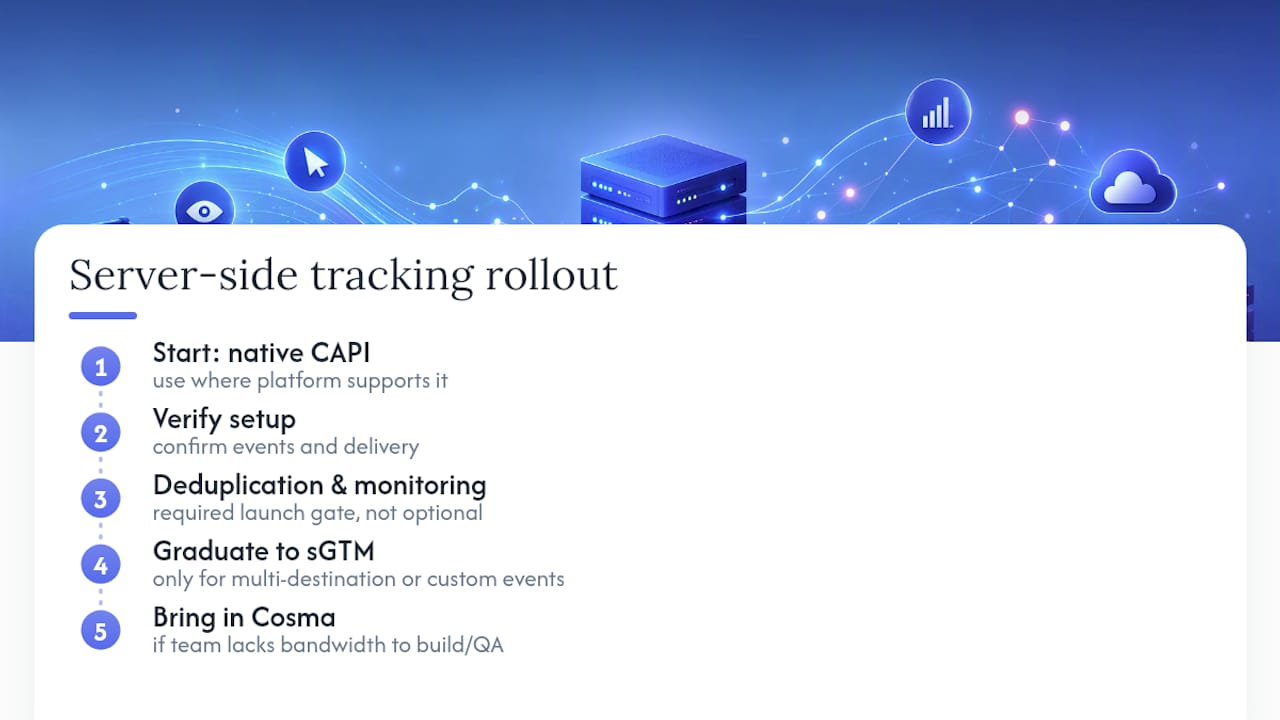
Yes, and the sequencing matters more than the tooling. Start with native CAPI where your platform supports it, verify it, then graduate to sGTM only once you need multi-destination routing or custom events. Deduplication and monitoring are the launch gate, not a nice-to-have you add later. If your team lacks the bandwidth to build and QA this properly, that’s exactly the point where bringing in Cosma makes sense.
How Cosma Handles CAPI and Server-Side GTM for Ecommerce Brands
Getting the theory right is one thing. Getting Event Match Quality above 7 while your team is also running paid media is another, which is why many brands turn to reliable analytics and measurement partners for support. My team at Cosma implements, tests, and validates CAPI and server-side GTM setups for DTC and ecommerce brands across the US and Canada, then we tune match quality against real backend orders until the numbers hold.

We’re not selling a hosted gateway or a plug-in. We’re the team that sits inside your ad account, builds the server-side pipeline correctly the first time, and ties it directly to campaign optimization, since better signal is worthless if nobody adjusts bidding and creative around it. You can see how this plays out in practice in our case studies, or look through examples of the broader creative and measurement work in our portfolio. If your Event Match Quality has been stuck for months, book a call and we’ll walk through what’s actually broken.
Sources
- An introduction to server-side tagging
- Meta Conversions API documentation
- Server-side best practices — Mixpanel
- Client vs server-side tracking — Tealium
FAQ
What Is Server-Side Tracking?
Server-side tracking is a method of sending conversion and behavioral data through a server you control before it reaches an ad platform, rather than sending it directly from the visitor’s browser. This lets you enrich, filter, and verify data before it’s forwarded to platforms like Meta or Google.
What Is the Server-Side Tracking Process?
An event fires from your site or app, gets sent to your server (or a server container like sGTM), and that server processes, deduplicates, and forwards it to each destination platform via APIs like the Meta Conversions API. The process requires manually capturing signals like IP address, user agent, and UTMs that browsers normally pass along automatically.
Is Server-Side Tracking Legal?
Yes, server-side tracking itself is legal, but it doesn’t remove your consent obligations under regulations like GDPR or CCPA. Your server logic still needs to check consent status before forwarding any personal identifier to an ad platform.
What Is the Difference Between Client-Side and Server-Side Tracking?
Client-side tracking sends data directly from the visitor’s browser to the ad platform and is vulnerable to ad blockers and browser privacy restrictions. Server-side tracking routes that same data through your own server first, which improves reliability and can reduce page load weight since fewer third-party scripts run client-side.
Do I Need Server-Side GTM, or Is Native CAPI Enough?
For most single-platform ecommerce stores, native CAPI (like Shopify’s built-in toggle) covers the majority of the gap. Server-side GTM becomes worth the added complexity once you need to route events to multiple destinations or fire custom events your platform doesn’t natively support.


