Mobile First Facebook Collection Ads: 2 Levers That Scale DTC
A Facebook Collection ad pairs a hero image or video with shoppable product tiles that open a full-screen Instant Experience on tap. Use it when you want mobile-first browsing that raises purchase intent before the shopper ever reaches your site. The two levers that decide whether it works: catalog integration and which Instant Experience template you attach.
TL;DR:
- Collection ads perform best when connected to a strong, frequently refreshed catalog with correct product data, ideally updated hourly for fast-moving inventory.
- Using a Storefront template benefits large catalogs with 50 or more SKUs, while Lookbook suits lifestyle brands aiming to boost average order value through aspirational imagery.
- Successful creative strategies involve high-quality cover images or videos that quickly hook viewers and separate instant experience content from the cover for maximum engagement.
- The format is strictly mobile-only and should target audiences in early to mid-funnel stages, such as lookalike prospects or recent site visitors, since it doesn’t serve effectively on desktop.
- Metrics like Instant Experience tap rate and view time are more indicative of success than cover click-throughs alone, and avoiding stale catalogs or mismatched creative prevents common performance pitfalls.
Table of Contents
- What Makes Up a Collection Ad Format?
- How Do You Set Up a Collection Ad in Ads Manager?
- Which Instant Experience Template Should You Use?
- Why Does Catalog Setup Decide Most of Your Results?
- What Creative Choices Actually Move Collection Ad Performance?
- How Should You Target Collection Ads for Best Results?
- What Metrics Actually Tell You If a Collection Ad Is Working?
- What Are the Most Common Collection Ad Mistakes?
- Practitioner Notes: How I Use Collection Ads at Cosma
- An Honest Take on When Collection Ads Actually Earn Their Spot
- Want an Audit of Your Current Collection Ad Setup?
- Sources
- FAQ
What Makes Up a Collection Ad Format?
A Collection ad has three layers. The cover is a static image or video sitting at the top of the unit. Below it sit four smaller product tiles pulled straight from your catalog. Tap either one, and Meta opens a full-screen Instant Experience built from templates you choose during ad creation.
That structure is fixed. What changes constantly are the specs Meta enforces around it, and 2026 has brought a few adjustments worth knowing before you build anything.
Cover images should run at a 1:1 or approximately 4:5 ratio for Feed placements, at a minimum resolution of 1080x1080 pixels, in JPG or PNG format. Cover video works the same way but is recommended to be up to 15 seconds for clean playback across mobile connections. Primary text is recommended to be under 125 characters to avoid truncation, and headlines under 40 characters for best display. Product tiles always display as a set of four regardless of catalog size, though the tiles themselves auto-populate from whatever product set you connect.
One placement fact catches people off guard every time: Collection ads render mobile-only. There’s no desktop version of the tap-to-expand behavior, so if your audience skews desktop-heavy for higher-ticket purchases, this isn’t the format to force.
| Spec | Requirement |
|---|---|
| Cover image ratio | 1:1 or 4:5 |
| Cover video length | Up to 15 seconds recommended |
| Minimum resolution | 1080x1080 px |
| Primary text limit | 125 characters |
| Headline limit | 40 characters |
| Product tiles shown | 4, fixed |
| Placement availability | Mobile only |
Meta also shifted how you access this format inside Ads Manager. Collection now lives as a display option under ad creative format, not as a standalone objective you pick at the campaign level. If you’re used to an older workflow, expect to find it one layer deeper than before.
How Do You Set Up a Collection Ad in Ads Manager?
Before opening Ads Manager, get three things in order: a synced product catalog in Commerce Manager, your cover assets exported to spec, and a connected Facebook Page. Skipping any of these mid-build wastes more time than it saves.
- Choose your campaign objective. Sales, catalog sales, or traffic objectives all support Collection. Awareness-only objectives generally do not.
- Build your ad set targeting as you normally would, then confirm mobile placements are active. Since Collection only serves on mobile, leaving desktop-only placements selected will simply prevent delivery.
- At the ad level, select your ad creative format and enable Collection. This is the step Meta relocated in its recent workflow update, so look under creative format options rather than a top-level format picker.
- Upload your cover asset and confirm the crop preview across Feed, Stories, and Reels placements individually. Cropping that looks fine in one placement often clips a logo or product edge in another.
- Attach your Instant Experience. You can build a new one from a template or reuse an existing one saved to your Page. Pick the template that matches your campaign goal (more on that below).
- Connect your catalog and product set inside the Instant Experience builder. This is where dynamic tiles get their data.
- Decide between dynamic ordering and manual product selection. Dynamic ordering lets Meta rank products per viewer based on likelihood to convert; manual selection locks in a fixed set you choose by hand.
- Preview the full experience on an actual mobile device using Meta’s preview tool, not just the desktop simulation panel. Tap-through feel is different on a real screen.
- Run your QA checklist before publishing: confirm catalog sync status is “healthy,” confirm out-of-stock items are excluded or hidden, confirm pricing matches your live site, and confirm your Instant Experience CTA button routes to the correct destination.
Skip that last checklist item and you’ll find out about a broken link from your CFO, not your dashboard.
Which Instant Experience Template Should You Use?
Meta offers four Instant Experience templates, and each one solves a different job. Picking based on habit instead of campaign goal is one of the more common reasons Collection ads underperform.
- Storefront works best for catalogs with 50 or more active SKUs, since it’s built for scroll-and-browse behavior and needs enough inventory to feel complete rather than sparse.
- Lookbook trades browsing density for aspirational sequencing, showing lifestyle imagery that often supports a higher average order value even when raw conversion rate runs lower.
- Customer Acquisition functions more like a mini landing page, useful when the goal is lead capture or app installs rather than a direct product browse.
- Storytelling sequences screens in order, which suits product launches or education campaigns where the shopper needs context before seeing the offer.
Storefront generally requires an active catalog connection to populate correctly, so confirm your feed is live before building it. Lookbook, by contrast, tends to reward brands willing to shoot dedicated lifestyle content rather than reusing product photography, since the entire template lives or dies on visual quality. Storefront converts best for large catalogs, while Lookbook tends to lift average order value for lifestyle-driven brands, which makes template choice a genuine strategic decision rather than a cosmetic one.
Why Does Catalog Setup Decide Most of Your Results?
Catalog quality is the single biggest lever in Collection ad performance, and most underperforming campaigns trace back to a thin or stale feed rather than bad creative.
Meta needs specific fields to populate tiles correctly and rank them intelligently:
id,title, anddescriptionfor basic product identityavailabilityandpricekept current so tiles never show a sold-out item as purchasablelinkandimage_linkpointing to live, accurate URLsbrandandgoogle_product_categoryto help Meta’s ranking logic understand what it’s showing
Refresh cadence matters more than most brands assume. A daily feed refresh is the practical minimum, but fast-moving inventory, think flash sales or limited drops, needs hourly syncing to avoid selling something that’s already gone.
Pro Tip: If your catalog updates less than daily, don’t use dynamic ordering on high-turnover SKUs. Build a manually curated product set instead, and refresh it by hand until your feed syncs faster.
Dynamic ordering lets Meta rank products per viewer based on individual likelihood to convert, which is exactly why it tends to outperform manual selection at scale. Manual sets still earn their place for curated drops or seasonal pushes where you want full creative control over which four products lead. Building a product set for that purpose takes a few minutes in Commerce Manager: tag the SKUs you want grouped, name the set, and connect it directly inside your Instant Experience builder.
What Creative Choices Actually Move Collection Ad Performance?
Cover creative earns the tap. Instant Experience content earns the click-through. Treat them as two separate creative jobs, not one asset stretched across both.
- Hook viewers in the first one to three seconds if you’re running cover video. Mobile scroll speed punishes slow openings before the product even appears on screen.
- Match the cover’s visual context to your actual audience. A gym apparel brand showing studio product shots instead of in-use lifestyle imagery is leaving tap rate on the table.
- Use a different hero image inside the Instant Experience than the one on the cover. Showing the same asset twice gives the viewer no reason to keep engaging once they’ve already tapped.
- Keep primary text and headlines tight within the character limits noted earlier, front-loading the specific benefit rather than a generic brand line.
- Build an A/B test matrix that isolates variables, cover video against cover image, then separately, one IE opening screen against another. Testing both at once tells you nothing about which change caused the result.
Pro Tip: Run your cover and Instant Experience tests on separate schedules. If you change both simultaneously, you won’t know whether a tap rate lift came from the cover or the template swap.
For teams that need copy variations at catalog scale, a tool like the Facebook Ad Generator from AmmarAI can speed up primary text and headline testing without pulling a copywriter into every iteration.
How Should You Target Collection Ads for Best Results?
Collection sits comfortably in two funnel stages: cold discovery and warm retargeting. Trying to force it into pure bottom-funnel remarketing usually undersells what the format does well, which is browsing, not closing.
- For prospecting, Advantage+ audiences or 1% to 3% lookalikes built off purchasers tend to give Meta enough signal to find similar buyers efficiently.
- For retargeting, custom audiences built from ViewContent and AddToCart events let you show the exact products a shopper already considered, right inside the same tile format.
- Video-view audiences, people who watched a threshold percentage of a previous video ad, make a strong secondary retargeting layer for brands running heavier video content upstream.
- Segment product sets by audience type: show recently viewed items to site visitors, and show best-sellers or new arrivals to broader lookalike audiences who have no browsing history yet.
Bid strategy rarely needs to be exotic here. Standard cost-cap or highest-volume bidding both work fine once the creative and catalog are solid; the format’s performance ceiling is set by tap rate and catalog health, not bidding sophistication. For a deeper look at where Collection fits against your broader audience stack, my Meta Ads strategy breakdown covers Advantage+ and lookalike sequencing in more detail.
What Metrics Actually Tell You If a Collection Ad Is Working?
Cover click-through rate alone is not representative of true ad performance for Collection ads. Instant Experience tap rate and IE view time matter more for diagnosing real performance, because they show whether the shopper actually engaged with the product browsing experience you built.
Add these columns in Ads Manager under the customize columns menu. If tap rate is healthy but IE view time collapses, the problem lives inside the Instant Experience, not the cover. If outbound clicks look fine but add-to-cart craters, check your site handoff before touching the ad itself.
What Are the Most Common Collection Ad Mistakes?
- Relying on manual product selection with a stale feed, which quietly serves out-of-stock or repriced items to shoppers.
- Mismatching cover creative and Instant Experience content, so the tap delivers a different message than the shopper expected.
- Optimizing only against cover CTR while ignoring IE tap rate and view time, the metrics that actually explain what happened after the tap.
- Running Collection when the campaign needs desktop reach, since the format simply won’t serve there.
- Skipping placement-by-placement crop previews, which is how logos and product edges end up clipped in Stories or Reels.
Practitioner Notes: How I Use Collection Ads at Cosma
My team at Cosma default to catalog-driven Storefront for clients with larger inventories, ranking SKUs dynamically rather than curating by hand, since it scales without constant manual upkeep. A typical test plan pits cover video against cover image while separately testing two IE opening screens, isolating one variable at a time.
Feed refresh policy stays non-negotiable: daily minimum, hourly for anything with fast inventory turnover.
An Honest Take on When Collection Ads Actually Earn Their Spot
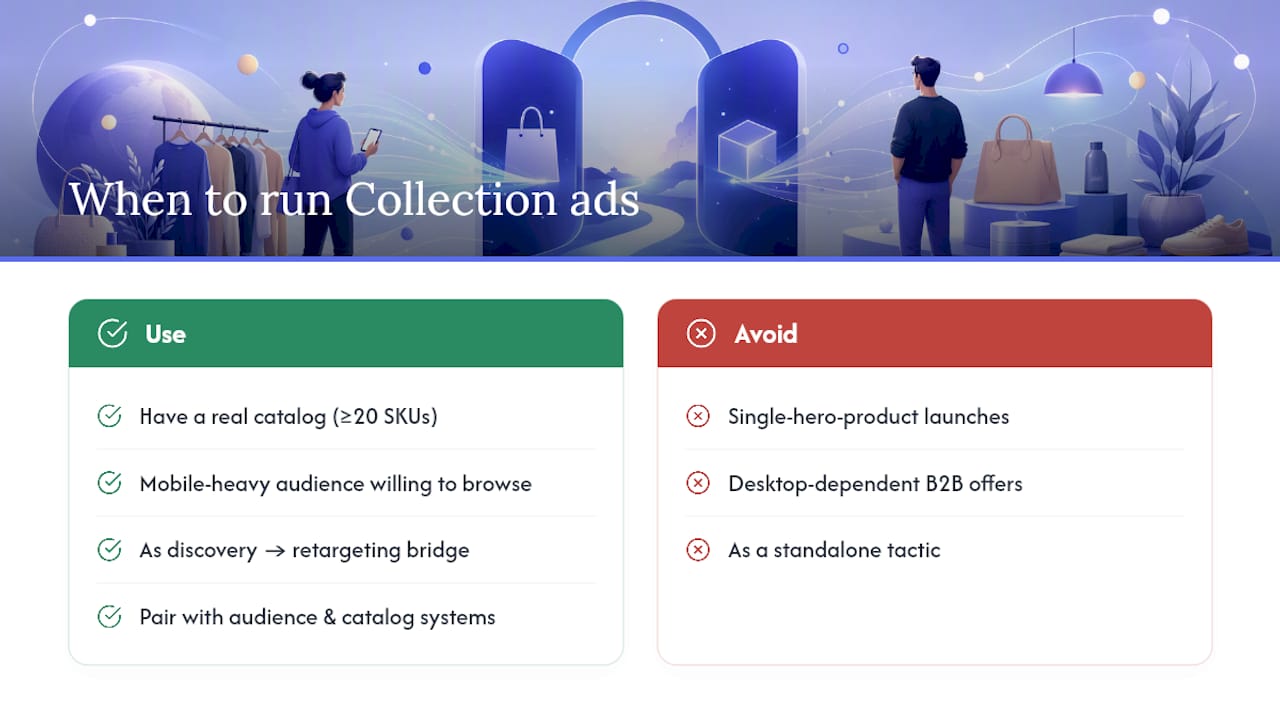
Collection ads belong in your rotation when you have a real catalog to show off, ideally 20 or more active SKUs, and a mobile-heavy audience willing to browse before buying. They don’t belong there for single-hero-product launches or desktop-dependent B2B offers, where the tap-to-browse mechanic adds friction instead of removing it.
At Cosma, we build Collection into funnels as a discovery-to-retargeting bridge, not a standalone tactic, pairing it with the audience and catalog systems already covered above. If your catalog and creative are solid but results still lag, the gap is usually in measurement, not strategy.
— Stefano Mazzei
Want an Audit of Your Current Collection Ad Setup?
If you’re running Collection ads and can’t tell whether tap rate, catalog health, or targeting is holding you back, that diagnosis is exactly where an outside set of eyes pays for itself faster than another round of internal guessing. My team at Cosma runs full audits on catalog structure, creative testing cadence, and campaign architecture for DTC and ecommerce brands scaling paid acquisition across the US and Canada.

We handle catalog setup and feed hygiene, build and test Instant Experience creative variants, and manage the ongoing optimization once a Collection campaign is live. Some brands only need a one-time audit; others bring us in to run acquisition end to end once the internal team hits a scaling ceiling. You can see how this has played out for other ecommerce clients in our case studies, browse creative examples in our portfolio, or book a call to walk through your current setup and figure out which path fits.
Sources
- About collection ads | Meta Business Help Center
- Meta Collection Ads Guide 2026: Setup, Creative & Catalog
FAQ
What’s the difference between collection ads and carousel ads on Facebook?
Collection ads open a full-screen Instant Experience on tap, letting shoppers browse an entire catalog inside the ad, while carousel ads simply scroll through a fixed set of individual cards without that expanded browsing layer.
Can you give an example of a Collection ad?
A typical example is an apparel brand showing a lifestyle cover video with four product tiles beneath it. Tapping any tile opens a Storefront-style Instant Experience displaying dozens more catalog items for browsing.
How do I remove a Collection ad on Facebook?
Go to your ad in Ads Manager, select the ad, and either pause or delete it directly from the ad-level menu. This removes the ad without affecting the rest of the ad set.
Does Facebook tell you who viewed your Collection ad?
No. Meta reports aggregate performance metrics like IE tap rate, IE view time, and reach, but it does not identify individual users who viewed or tapped into your Collection ad’s Instant Experience.


