50 Purchases a Week: When DTC Brands Should Use Advantage+ Sales
Advantage+ Shopping Campaigns are now called Advantage+ Sales, and the rename reflects a real shift: Meta folded shopping automation into a broader, more flexible sales format with restored audience controls. My rule of thumb is simple. If your account generates steady conversion volume and you can supply fresh creative on a real schedule, run it. If you can’t feed the algorithm enough purchases or enough new assets, you’ll get noisy results and should stick to manual campaigns until your data catches up.
TL;DR:
- Advantage+ Sales require a weekly purchase volume of around 50 to reliably exit the learning phase and achieve stable results.
- A daily budget of at least $50 to $100 is needed, depending on your average order value, to generate enough conversions for algorithm stabilization.
- Successful setup depends on clean product catalog data and accurate pixel tracking of purchase events to provide high-quality signals.
- Running creative variations of at least four to six assets with refreshes every two to four weeks helps maintain campaign performance and avoid fatigue.
- Monitoring blended revenue and controlling for existing customer spend are necessary to accurately measure true campaign impact beyond platform-reported ROAS.
Table of Contents
- What Happened to Advantage+ Shopping Campaigns?
- How Does Meta’s Automation Actually Work?
- How Do I Set Up an Advantage+ Sales Campaign?
- What Budget and Creative Volume Does Advantage+ Need?
- Is Advantage+ ROAS Actually Telling You the Truth?
- Why Is My Advantage+ Campaign Missing or Underperforming?
- My Pre-Launch Checklist at Cosma
- When I Recommend Advantage+ Sales, and When I Don’t
- How My Team at Cosma Helps You Run This Right
- Where to Read the Official Guidance
- Sources
- FAQ
What Happened to Advantage+ Shopping Campaigns?
Meta launched Advantage+ shopping campaigns in 2022 as a fully automated format built for ecommerce advertisers who wanted Meta’s algorithm to handle targeting, placement, and creative selection with minimal manual input. In its announcement, Meta reported internal A/B testing showed roughly a 12% lower cost per purchase compared to standard shopping ads. That number is why so many DTC brands adopted the format early and never looked back.
The name changed through 2025 as Meta consolidated the format into Advantage+ Sales, a broader campaign type that keeps the automation engine but restores flexibility advertisers had lost. Structural changes worth knowing:
- Audience controls are back. Early Advantage+ Shopping stripped out targeting inputs almost entirely; Advantage+ Sales lets you add audience suggestions and exclusions again.
- Ad set limits loosened. You can now run multiple ad sets inside one Advantage+ Sales campaign instead of being locked into a single automated set.
- The objective broadened from “Shopping” specifically to “Sales,” which covers on-Facebook checkout, website purchases, and app-based purchase events under one umbrella.
If you’re still running a legacy campaign labeled “Advantage+ Shopping,” it hasn’t necessarily broken. Meta migrated most active campaigns automatically, and practitioner analysis of the transition confirms the underlying bidding and creative logic carried over. New campaigns you build today will default to the Sales objective with Advantage+ automation enabled, not a standalone “Shopping” campaign type. If you can’t find the old option in Ads Manager, that’s expected, not a bug.
How Does Meta’s Automation Actually Work?
Advantage+ automates five distinct levers at once: audience targeting, placement selection, budget allocation across ad sets, creative combination testing, and bid optimization toward your stated goal. According to Meta’s own product documentation, the system mixes your uploaded creative assets, tests combinations across Feed, Reels, Stories, and Marketplace, and shifts budget toward whatever combination is converting best in near real time.
That last part is why the format is often described as “creative-hungry.” Feed it two static product shots and Meta has almost nothing to test. Feed it six distinct assets, mixing UGC testimonials, lifestyle shots, and clean product photography, and the algorithm has real combinations to run through its bidding engine. This is the biggest mental shift for teams coming from manual campaigns: you’re not writing one ad, you’re building a testing library.
None of this works without clean signal going into the system. Two inputs matter more than people expect:
- Your product catalog needs accurate titles, high-resolution images, GTINs, and live availability status, since Meta pulls creative directly from catalog data in dynamic formats.
- Your pixel or Conversions API setup needs to fire purchase events reliably, because the bidding algorithm optimizes toward whatever conversion signal it can actually see.
A messy feed or a half-broken pixel doesn’t just hurt reporting. It starves the automation of the exact data it needs to make good decisions, which causes many Advantage+ underperformance issues.
How Do I Set Up an Advantage+ Sales Campaign?
Setup is quick, but the details that make or break performance happen before you hit publish, not after. Here’s the sequence I check every time:
- Select the Sales objective in campaign creation and confirm Advantage+ automation is toggled on, along with campaign-level budget optimization (CBO) so budget flows to your best-performing ad sets.
- Connect your product catalog through Commerce Manager and confirm feed health, checking specifically for missing images, incomplete titles, and out-of-stock items that haven’t synced.
- Verify your Pixel and Conversions API are both firing and that purchase events match your actual order volume. A mismatch here is the single most common cause of a stalled learning phase.
- Set an existing-customer budget cap. This tells Meta what share of spend can go toward people who already purchased, which keeps the algorithm from quietly optimizing toward cheap repeat sales instead of new customer growth. You’ll define this using a customer list audience.
- Upload at least 4 to 6 creative variants spanning different formats and hooks, then choose highest-value bidding if your catalog has a wide price range, or lowest-cost bidding if pricing is tight and uniform.
- Set your daily budget high enough to clear the conversion threshold your account needs to exit learning, which I cover in the next section.
Pro Tip: Before you launch, pull your last 30 days of purchase volume. If you’re nowhere near the weekly conversion threshold Advantage+ needs to stabilize, don’t launch yet. Fix tracking or grow volume first, because a campaign stuck in permanent learning phase burns budget without ever giving you a real read.
What Budget and Creative Volume Does Advantage+ Need?
Advantage+ rewards accounts with real conversion signal, and that threshold isn’t vague. Practitioner guidance puts the target at roughly 50 purchases per week to reliably exit the learning phase and get stable, repeatable results. Fall well short of that and you’ll see performance swing wildly week to week, which is the algorithm still searching for a pattern rather than executing on one.
Budget floors follow from that conversion target. Depending on your average order value, that generally means a daily budget somewhere in the $50 to $100 range, though a higher-AOV brand needs less spend to hit the same purchase count than a low-margin, high-volume brand does. If your daily budget can’t mathematically produce 50 purchases a week at your current conversion rate, no amount of creative optimization will fix the volatility.
Creative cadence matters just as much as volume; effective cross-platform creative rotation and anti-fatigue tactics ensure your Advantage+ campaigns stay fresh and high-performing. Plan on:
- 4 to 6 distinct creative concepts minimum, mixing UGC, lifestyle context, and clean product shots so the algorithm has genuinely different angles to test, not just color variations of one ad.
- A refresh every 2 to 4 weeks, swapping out your weakest-performing concept rather than the whole set, so you’re not resetting learning unnecessarily.
Existing-customer budget caps deserve a specific number, not a vague instruction. I generally set this between 10% and 30% depending on the brand’s goal: closer to 10% if the priority is pure new-customer growth, closer to 30% if the brand has a strong repeat-purchase rate and retention revenue matters as much as acquisition.
Most mature accounts I work with don’t run Advantage+ alone. A hybrid architecture, Advantage+ Sales handling broad automated prospecting alongside a manual campaign for brand defense terms or high-value retargeting segments, tends to outperform an all-in or all-out approach. Advantage+ is genuinely strong at broad discovery, a point my post on broad targeting covers in more depth, but it isn’t built to replace precision retargeting of your highest-intent segments.
Is Advantage+ ROAS Actually Telling You the Truth?
In-campaign ROAS on an Advantage+ Sales campaign can look fantastic while your overall business barely grows, and that gap is the single most common measurement mistake I see. The fix is to stop treating platform ROAS as the final answer and start tracking MER (marketing efficiency ratio), or blended ROAS across every channel, against total revenue instead of Meta’s self-reported number alone.
Platform ROAS can hide cannibalization: Advantage+ is efficient at finding people who were already going to buy, including your own existing customers, which inflates the in-campaign number without adding real incremental revenue. A practical breakdown of this issue makes the same point, and it’s why holdout testing matters more than any dashboard metric.
A few habits fix this:
- Run a geographic or audience holdout, pausing Advantage+ spend in a comparable region or segment for two to four weeks, and compare revenue delta against the active region.
- Break out new versus returning customer revenue weekly. If new-customer share is shrinking while ROAS climbs, your existing-customer cap needs tightening.
- Treat Meta’s Opportunity Score as a pre-launch configuration checklist, not a forecast of returns. It flags missing setup steps, not future performance.
- Move toward server-side tracking through the Conversions API to reduce signal loss and tighten attribution accuracy, a step I walk through in this server-side tracking guide.
Why Is My Advantage+ Campaign Missing or Underperforming?
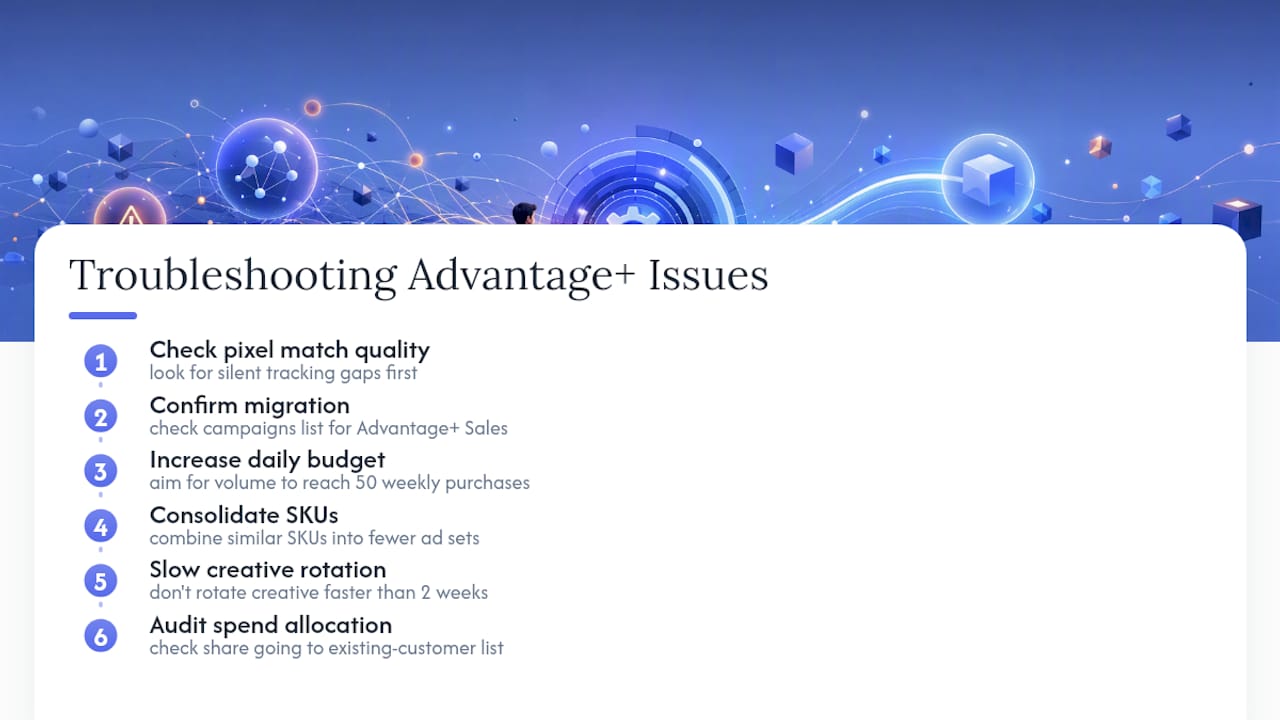
Advantage+ Shopping option is gone. This almost always means your account migrated to Advantage+ Sales already. Check your existing campaigns list before assuming something broke. Legacy campaigns typically carried their learning data forward through the transition.
Performance swings wildly week to week. This is the classic symptom of insufficient conversion signal. Fixes, in order of impact: raise the daily budget toward the volume needed for 50 weekly purchases, consolidate similar SKUs into fewer ad sets so signal isn’t split too thin, and stop rotating creative faster than every two weeks.
ROAS looks great but new customers aren’t growing. Check what share of spend is going to your existing-customer list.
Pro Tip: Before troubleshooting anything else, check your pixel event match quality first. A silent tracking gap masquerades as every one of the symptoms above.
My Pre-Launch Checklist at Cosma
Before my team at Cosma turns on any Advantage+ Sales campaign for a client, we run the same short list every time:
- Confirm feed hygiene and event mapping are both clean, with purchase events matching real order counts.
- Confirm baseline conversion volume is close enough to the weekly threshold that the campaign can actually exit learning.
- Write a creative brief covering 4 to 6 assets, each with a clear hypothesis, meaning a specific hook, offer, and format we expect to win and why.
- Set a testing cadence: creative refreshes every two to four weeks, with a quarterly geographic holdout to check incrementality.
Pro Tip: A simple holdout works like this: pick two comparable regions, run Advantage+ in one and pause it in the other for three to four weeks, then compare revenue growth between them. Success looks like the active region outgrowing the paused one by more than normal seasonal variance, not just a higher platform ROAS number.
When I Recommend Advantage+ Sales, and When I Don’t
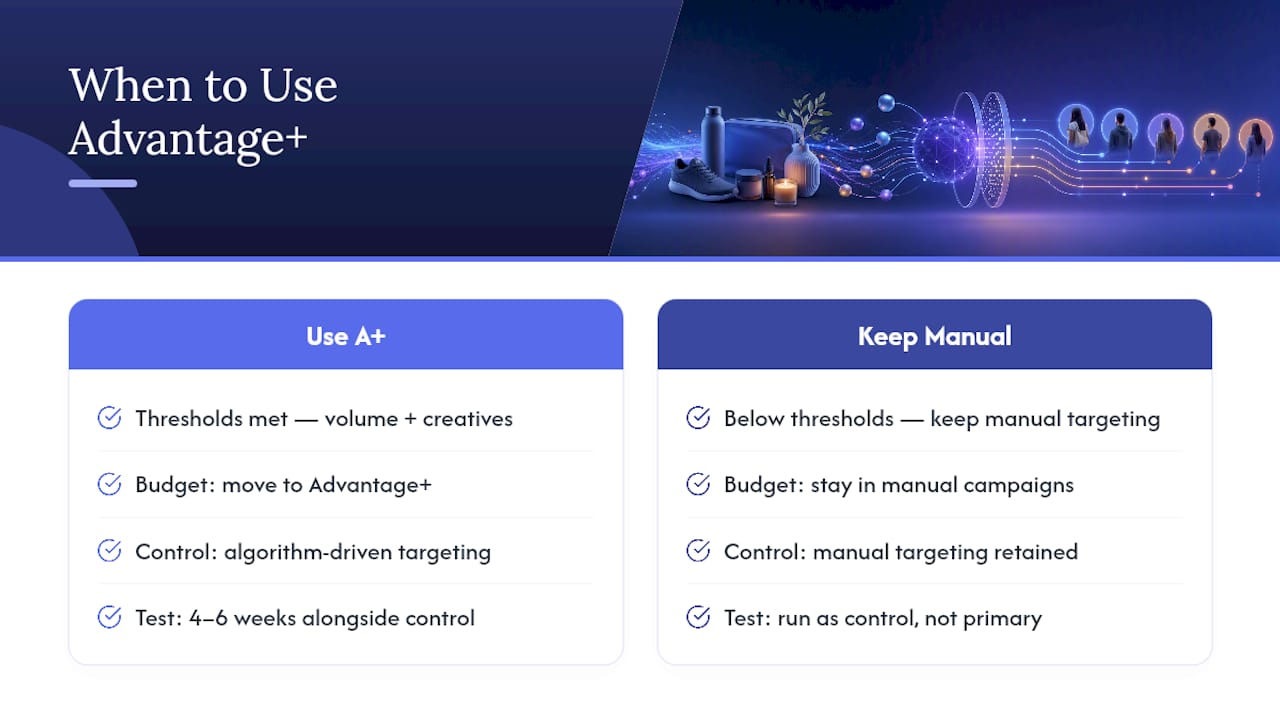
I recommend Advantage+ once an account clears both thresholds: enough weekly purchase volume to exit learning and enough creative supply to give the algorithm real variety to test, a framework I detail further in my Meta Ads strategy piece. Below that line, I keep budget in manual campaigns where I control targeting directly.
I never fully replace manual campaigns for brand defense terms or my highest-value retargeting segments. My testing rule is fixed: run Advantage+ for four to six weeks alongside a manual control, then judge the result on blended MER, never on the campaign’s own reported ROAS.
— Stefano Mazzei
How My Team at Cosma Helps You Run This Right
Getting Advantage+ Sales to actually perform comes down to feed hygiene, tracking accuracy, and creative volume, and most brands get at least one of those three wrong on their first launch. My team at Cosma runs full audits on all three before we touch budget, then builds the creative testing library that keeps the algorithm fed instead of guessing.

We handle the setup end to end: catalog and pixel audits, Advantage+ campaign structuring with proper existing-customer caps, creative planning built around the framework in my performance creative guide, and the holdout testing that tells you whether your ROAS is real or borrowed from customers you already had. You can see how this plays out for actual DTC brands in our case studies and browse creative examples in our portfolio. If you want a straight read on whether your account is ready for Advantage+ or needs fixing first, book a strategy call and we’ll walk through your account together.
Where to Read the Official Guidance
Start with Meta’s own Advantage+ Sales Help Center documentation for setup specifics, then Meta’s product overview for feature definitions and the original automation announcement for context on why the format exists.
Sources
- Introducing New Automation Tools to Increase Sales and Drive Growth — Meta (news)
- Advantage+ Shopping Campaigns: Automated Shopping Ads — Meta Business
- Advantage+ Shopping Campaigns: 2026 Guide & Best Practices — Denote
FAQ
What Is an Advantage+ Sales Campaign?
It’s Meta’s automated sales campaign format, the successor to Advantage+ Shopping, that uses machine learning to handle targeting, placement, creative mixing, and bidding under a single Sales objective.
Should I Turn On Advantage+ Audience Targeting?
Turn it on if your account has enough conversion volume to reach roughly 50 purchases a week; below that threshold, keep manual audience controls active until your signal strengthens.
Is $10 a Day Enough for Facebook Ads?
Not for Advantage+ Sales specifically. Depending on your average order value, you generally need somewhere between $50 and $100 a day to generate enough purchases for the algorithm to stabilize.
What Are Some Famous Automated Ad Campaigns?
Meta’s own Advantage+ launch is one of the most cited examples in the industry, with the company reporting a roughly 12% lower cost per purchase in internal testing against standard shopping ads.
How Long Should I Test Advantage+ Before Judging Results?
Run it for four to six weeks alongside a manual control campaign, then compare blended MER across both rather than relying on either campaign’s self-reported ROAS.


