50 Purchase Rule for Ecommerce Facebook Catalog Ads: Cosma
Advantage+ catalog ads, the current name for what used to be called dynamic product ads, automatically match the right product to the right shopper using your catalog and Meta’s behavioral signals. Use them when you need scalable, personalized product advertising across Facebook and Instagram. Before launching one, you need three things in place: a clean product catalog, working Pixel and Conversions API tracking, and a feed with accurate, matching IDs.
TL;DR:
- Campaigns should aim to generate at least 50 purchase events per week per ad set to exit the learning phase and achieve stable performance.
- Precise matching of product IDs between the feed and tracking events is essential to ensure relevant personalization and avoid showing irrelevant products.
- A well-maintained feed with real-time updates on prices, stock status, and accurate product information prevents delivery issues and cost inefficiencies.
- Consolidating campaigns and increasing budgets to support multiple purchases daily helps the algorithm optimize more effectively than fragmented structures.
- Starting with Advantage+ Shopping campaigns and regularly rotating three to five creative concepts accelerates testing and improves ad stability.
Table of Contents
- What Are Facebook Catalog Ads and How Do They Work?
- Prerequisites: Catalog, Feed, Pixel, and CAPI
- How to Create Catalog Ads on Facebook: Step by Step
- Product Feed and Catalog Data Best Practices
- Creative Formats and Wrapper Copy That Convert
- Campaign Structure, Budgets, and the Learning Phase
- Optimization and Testing Cadence for Catalog Ads
- Common Catalog Ad Problems and How to Fix Them
- Practitioner Playbook: Account-Level Rules I Use at Cosma
- When I Choose Catalog Ads Over Other Meta Strategies
- How My Team at Cosma Can Help You Implement Catalog Ads
- Sources
- FAQ
What Are Facebook Catalog Ads and How Do They Work?
Catalog ads run on a simple loop: your product catalog feeds Meta a list of items, and behavioral signals (browsing, cart adds, past purchases) tell the system which of those items to show which person. No manual creative assembly, no static list of “top sellers” pushed to everyone. Meta automatically surfaces the most relevant products from your catalog to each viewer based on what they’ve actually done.
The naming has shifted over the years, and it trips people up in conversation. Dynamic product ads (DPAs) became “dynamic ads,” then Meta folded most of that logic into Advantage+ catalog ads as part of its broader push toward automated campaign types. Functionally, the mechanics haven’t changed as much as the name suggests. You’re still feeding a catalog, still relying on pixel and event data, and still letting an algorithm assemble the final creative.
These ads run across Facebook Feed, Instagram Feed and Stories, Audience Network, and Messenger, usually in carousel or single-image format pulled straight from your product images. That format flexibility is part of what makes catalog ads efficient for e-commerce: one campaign setup can serve thousands of SKUs without a designer touching each one.
Prerequisites: Catalog, Feed, Pixel, and CAPI
Before you open Ads Manager, get the infrastructure right. Skipping this step is the single biggest reason catalog campaigns underperform out of the gate.
You need a Meta Business Suite account with an ad account and a connected Page, plus a catalog built in Commerce Manager, which is where every catalog ad campaign pulls its product data from. Inside that catalog sits your product feed, and the feed needs specific fields to function: a unique id, title, price (with currency), availability, a working image_link, and a link back to the product page.
Tracking is the other half of the equation. You need:
- The Meta Pixel installed on every page of your site, especially product and checkout pages
- The Conversions API (CAPI) running alongside the pixel, sending server-side events as a backup channel
- Deduplication logic using a shared
event_idso the same purchase doesn’t get counted twice - Exact ID matching between your feed’s product IDs and the
content_idsyour pixel and CAPI events send
That last point deserves emphasis because it’s where most setups quietly break. Practitioner guides consistently point to exact ID matching as the difference between a catalog ad that personalizes correctly and one that shows random or irrelevant products.
For integration, you’ve got three real paths: Shopify’s native Facebook and Instagram channel (the fastest route for most merchants, since it automates catalog creation and syncing), a manually uploaded feed file, or a direct API connection for larger catalogs that need programmatic updates.
How to Create Catalog Ads on Facebook: Step by Step
Here’s the sequence I walk through with clients, from catalog to live campaign.
- Build or connect your catalog in Commerce Manager. If you’re on Shopify, connect the sales channel and let it sync automatically. If not, upload a feed file or connect via API, then create product sets (subsets of your catalog grouped by category, margin, or season) that you’ll target later.
- Confirm the pixel is firing and IDs match. Open Meta’s Events Manager, go to Test Events, and load a product page on your live site. Watch for a
ViewContentevent, then check that thecontent_idin that event payload matches theidfield for the same product in your catalog. A mismatch here (often a variant ID versus a parent product ID) is the most common setup error I see. - Create a new campaign with the Sales objective. In the campaign settings, select “Catalog Sales” or the equivalent Advantage+ catalog option, then choose your catalog and the specific product set you want the ad to draw from.
- Turn on Advantage+ creative and use Advantage+ placements. This lets Meta test creative variations (cropping, text overlay, format) and distribute across every eligible surface rather than restricting to one placement, which usually gives the algorithm more room to find efficient delivery.
- Set your initial budget and launch. Don’t underfund this step. Your daily budget should be able to support a handful of purchase events per day at minimum, or you’ll stall in the learning phase before Meta has enough data to optimize.
- Monitor closely for the first 48 to 72 hours. Check delivery, cost per purchase, and whether the right products are appearing in the ad previews. Resist the urge to touch budgets or targeting during this window unless something is clearly broken. Every edit resets the learning clock.
That first three days tells you almost everything. If cost per purchase is wildly unstable or the wrong products keep showing, the fix is almost never a targeting tweak. It’s a feed or tracking issue, and I’ll walk through the diagnostics later in this guide.
Product Feed and Catalog Data Best Practices
Your feed is the foundation everything else sits on. A campaign structure can be flawless and still underperform if the underlying data is inconsistent.
The rules that matter most:
- Match IDs exactly between your feed and your pixel/CAPI events, down to variant-level
item_group_idwhen you sell products with size or color options. - Format prices with currency codes attached, and keep
availabilityvalues (in stock,out of stock,preorder) updated in near real time, since Meta won’t advertise items marked unavailable. - Use HTTPS image links only; broken or insecure image URLs get products silently excluded from delivery.
- Apply custom labels to segment inventory by season, margin tier, or bestseller status, which becomes useful later for building targeted product sets.
- Automate feed updates on a schedule (hourly or daily, depending on how fast your inventory turns) rather than relying on manual uploads.
When something looks off, Commerce Manager’s diagnostics tab will flag rejected items and tell you why, usually a missing required field or a formatting error in price or availability.
Pro Tip: Pull a live ViewContent event from an actual product page and compare its content_id against the catalog ID for that same product in Commerce Manager. A large share of “personalization isn’t working” tickets I’ve diagnosed for clients trace back to a variant ID being sent by the pixel while the parent ID sits in the catalog.
Creative Formats and Wrapper Copy That Convert
Single image works fine for straightforward catalogs with strong product photography and a narrow SKU count. Carousel earns its place when you’re cross-selling within a category, letting the algorithm cycle through several related items in one ad unit. Collection format, which pairs a cover image or video with a grid of catalog products underneath, tends to perform best for lifestyle brands where the product needs visual context to make sense.
Wrapper copy (the headline and primary text wrapped around the dynamic product images) is where a lot of advertisers leave performance on the table by writing something generic. Templates that hold up across product sets:
- Offer-first: “20% off [category] this week only”
- Social proof: “Join [number] customers who switched to [product type]”
- Urgency: “Back in stock, limited quantities”
Turning on Advantage+ creative lets Meta test cropping, text placement, and format combinations automatically, which usually outperforms a single static wrapper once you have enough volume for the system to learn from; you can use tools like the Facebook Ad Generator: Primary Text & Headlines | AmmarAI to generate ad copy variations at scale for effective creative testing. Refresh your wrapper copy and any static creative elements every few weeks. Catalog ads still fatigue even though the product images rotate, because the surrounding copy and format stay static longer than most advertisers realize.
Campaign Structure, Budgets, and the Learning Phase
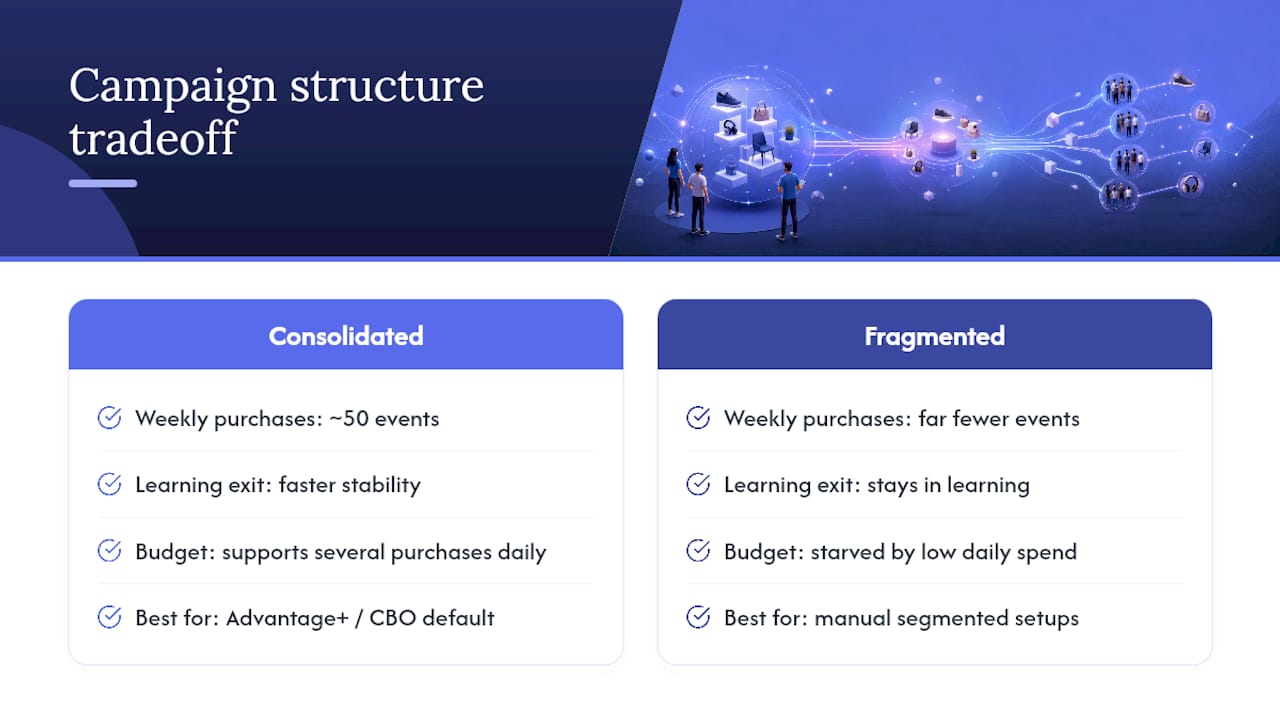
Consolidation is the rule I break the most often for new clients, because most accounts I inherit are split into far more campaigns than the data volume can support. Meta’s algorithm needs a concentrated stream of purchase events to exit the learning phase and stabilize costs. Splitting that same budget across five narrow campaigns starves each one of the signal it needs.
A workable rule of thumb: aim for roughly 50 purchase events per week per ad set or campaign (per “learning unit”) before expecting stable, optimized delivery. Fragmented campaign structures limit how much data the algorithm sees at any one decision point, which is exactly why consolidated Advantage+ or ASC campaigns tend to reach stability faster than a dozen small, narrowly targeted ones.
The 50-event benchmark: If your campaign isn’t generating close to 50 purchases a week, it’s still effectively in learning, no matter how long it’s been running. Consolidate before you conclude the offer or targeting is the problem.
Budget floors follow directly from that math. If your target cost per acquisition is an amount such as $40, a campaign spending a low daily budget is only buying a small number of purchases daily, nowhere near the volume needed for the algorithm to optimize with confidence. Set budgets that can plausibly generate several purchases a day, then let Campaign Budget Optimization or Advantage+ Shopping campaigns distribute spend across product sets automatically.
Advantage+ Shopping campaigns make sense as the default for most catalog-based e-commerce accounts, since the format is built around exactly the consolidation and automation this section describes. Manual, tightly segmented structures still earn their place for brand-new product launches with no purchase history, or for niche B2B SKUs where the audience is small enough that broad automation has nothing useful to learn from.
Optimization and Testing Cadence for Catalog Ads
Judging a new creative concept too early is the most common mistake I see in optimization reviews. Here’s the cadence that holds up:
- Let new concepts run 5 to 7 days and gather at least 500 to 1,000 impressions before drawing conclusions, since anything less is too small a sample to separate signal from noise.
- Test creative and audience separately when possible, but default to a hybrid approach inside Advantage+ campaigns, where the system handles audience distribution while you focus creative testing on wrapper copy and format.
- Scale winners gradually. Once a campaign holds a ROAS sustainably above your target for at least 72 hours, increase budget by 20% to 25% rather than doubling it. Large jumps reset learning and often tank performance right when you thought you’d found a winner.
- Run diagnostics in order when something breaks: verify events are firing correctly in Test Events, confirm the feed has no rejected items, check that the landing page loads fast and matches the ad’s promise, then look at the creative itself. Most people jump straight to blaming creative when the real issue sits upstream in tracking or feed health.
Pro Tip: Keep three to five creative concepts rotating at all times rather than testing one at a time. It shortens how long you wait for a statistically useful read and keeps a backup ready the moment your current top performer starts to fatigue.
Common Catalog Ad Problems and How to Fix Them
Most catalog ad issues trace back to one of four causes:
- ID mismatch between events and catalog. The pixel or CAPI sends a
content_idthat doesn’t match anything in your feed, so personalization breaks or ads get rejected. Recheck variant versus parent IDs first. - Wrong price or stock status showing in the ad. Almost always a feed update lag. Move to hourly or real-time syncing if your inventory changes fast.
- High cost per acquisition that never stabilizes. Usually a volume problem, not a targeting problem. Consolidate campaigns and raise the budget per learning unit before touching audience settings.
- Performance drop after weeks of stability. Creative fatigue. Rotate in new concepts and retire whatever’s been running longest, even if it was your best performer last month.
Practitioner Playbook: Account-Level Rules I Use at Cosma
When my team at Cosma sets up catalog ads for an e-commerce client, we work from a short list of account-level rules rather than reinventing structure for every account:
- Consolidate aggressively. Fewer campaigns with clear objectives consistently outperform fragmented structures because the algorithm gets more purchase-event volume to learn from, a principle we lean on in the broader Facebook Ads playbook my team uses across accounts.
- Set budget floors against target CPA before launch, not after a week of disappointing spend. If the math doesn’t support enough daily conversions, we raise the budget or narrow the product set.
- Keep three to five fresh creative concepts rotating and judge them once each hits 500 to 1,500 impressions, never sooner.
- Run a simple triage SOP whenever something looks off: check Test Events first, confirm feed IDs second, and review the landing page experience third.
Pro Tip: When a client’s CPA spikes overnight, the fix is rarely a bid or budget change. Nine times out of ten it’s a broken feed sync or a landing page that stopped loading properly after a site update.
When I Choose Catalog Ads Over Other Meta Strategies
Catalog ads are my default for any inventory-backed e-commerce account with a reliable feed and clean tracking. They’re the wrong tool for a brand-new product with zero purchase history, or a niche B2B SKU with an audience too small for automation to learn anything useful. In a test-to-scale workflow, catalog ads are usually where I put the budget once a product has already proven it converts through manual testing.
— Stefano Mazzei
How My Team at Cosma Can Help You Implement Catalog Ads
Getting Advantage+ catalog ads to actually perform is less about the campaign settings and more about everything upstream of them: tracking accuracy, feed hygiene, and enough creative rotation to keep the algorithm fed. That’s the part most in-house teams underestimate until they’re three weeks into a campaign wondering why costs won’t stabilize.

At Cosma, my team and I run this as a defined engagement: audit your current setup (pixel, CAPI, feed, campaign structure), fix the tracking and ID-matching issues we find, then move into creative testing and media scaling once the foundation is solid. It’s the same sequence outlined throughout this guide, applied to your specific account instead of a generic checklist. You can see how that process has played out for other e-commerce brands in our case studies, or look through examples of the creative testing work in our portfolio. If you want us to look at your account directly, book a call with my team and we’ll tell you honestly whether catalog ads are the right lever to pull right now.
Sources
- About Meta Advantage+ Catalog Ads
- Admanage
- The quick and easy way to put your Facebook ads on autopilot | Shopify blog
FAQ
How Do I Create Catalog Ads on Facebook?
Build a product catalog in Commerce Manager, connect a working feed (via Shopify, manual upload, or API), confirm your pixel and CAPI events match the catalog’s product IDs, then create a Sales objective campaign and select that catalog with Advantage+ creative turned on.
Is $10 a Day Enough for Facebook Catalog Ads?
Ten dollars a day rarely generates enough purchase events for the algorithm to exit the learning phase reliably, especially against a typical target cost per acquisition. Budget toward several purchases a day at minimum rather than a fixed low number.
How Much Do 1,000 Clicks Cost on Facebook?
Cost per 1,000 clicks depends heavily on your industry, targeting, and creative quality, and Meta doesn’t publish a universal rate. Rather than chasing a benchmark figure, judge performance against your own historical cost per click and cost per purchase.
How Do I Add Items to My Facebook Catalog?
Update your product feed, whether that’s through an automatic Shopify sync, a scheduled feed file upload, or an API push, and Commerce Manager will reflect new items once the feed refreshes and passes its data checks.
What’s the Difference Between Dynamic Ads and Advantage+ Catalog Ads?
They’re built on the same underlying mechanics: a catalog plus behavioral signals producing personalized product ads. Advantage+ catalog ads is simply the current name and adds more automated creative and placement testing on top of the original dynamic ads structure.


