Fix Pixel First: DTC 2026 Playbook for Dynamic Creative on Facebook
Use dynamic creative when you need Meta to test multiple asset combinations automatically, and use Advantage+ catalog ads when your priority is personalized product delivery at scale. For most ecommerce accounts running a live product catalog, Advantage+ catalog ads should be the default, with component-level dynamic creative reserved for angle and hook testing. Before either, confirm your Meta pixel and catalog feed are both firing clean data. Then launch a small test and let it run undisturbed for a full week.
TL;DR:
- Dynamic creative relies on sufficient conversion volume and clean pixel data, with signals mostly coming from your product feed and pixel events.
- Creative volume and diversity are now the primary factors for reaching new audiences, making a limited asset library a bottleneck in current Meta algorithms.
- Advantage+ catalog ads are ideal for volume selling with personalization, especially when your store has over 50 purchases weekly or seamless catalog sync.
- Proper setup requires verifying catalog accuracy, event firing, and creating non-overlapping assets with distinct angles before campaign launch.
- Consistent measurement of ROAS and signals like click-through rate and frequency are crucial to optimize and troubleshoot performance effectively.
Table of Contents
- What Is Dynamic Creative on Facebook, and How Does Meta Assemble It?
- What Changed: Andromeda, Advantage+, and Why Creative Now Drives Targeting
- Dynamic Creative vs. Advantage+ Catalog Ads: Which One Do You Need?
- How to Set Up Dynamic Creative in Meta Ads Manager: Step by Step
- Dynamic Creative Best Practices: Building an Asset Checklist That Actually Works
- How Do You Measure and Optimize Dynamic Creative Performance?
- A Practitioner’s Checklist for Launching Dynamic Creative Campaigns
- The Real Trade-Offs of Dynamic Creative Nobody Mentions
- Why the “Set It and Forget It” Advice Around Dynamic Creative Is Wrong
- How My Team at Cosma Can Help You Run This
- Sources
- FAQ
What Is Dynamic Creative on Facebook, and How Does Meta Assemble It?
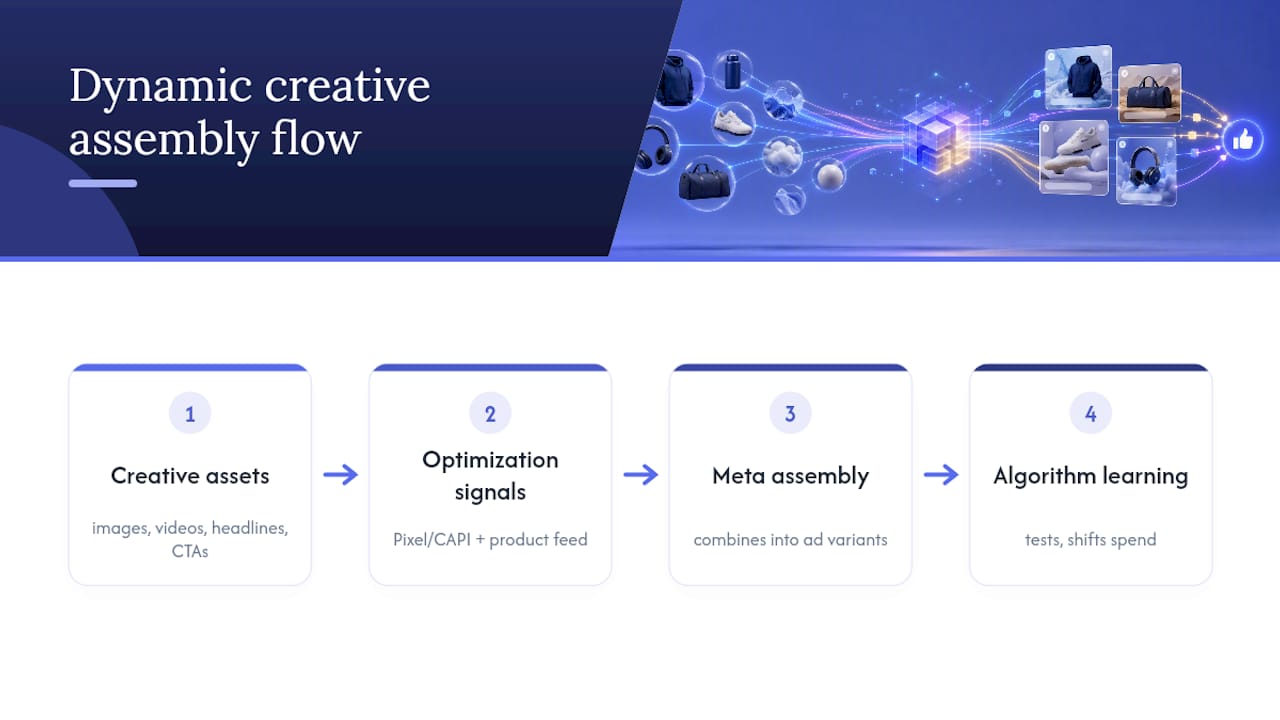
Dynamic creative is Meta’s system for combining separate creative components, images, videos, headlines, descriptions, and calls to action, into ad variants it tests automatically. Instead of building 20 static ad combinations by hand, you upload the pieces once and let Meta’s algorithm mix and serve whichever combination performs best for a given viewer.
The system leans heavily on two inputs: your Meta pixel events (or Conversions API data) and, for catalog campaigns, your product feed. Weak signal from either source means the algorithm is guessing rather than optimizing.
A typical dynamic creative test for a mid-size DTC brand involves multiple primary images or video clips that cover different angles, several headline variations testing varied value propositions, multiple description lines, and a couple of CTA button options.
Meta assembles these into dozens of possible combinations and shifts spend toward the ones getting results, refining the mix as data accumulates.
What Changed: Andromeda, Advantage+, and Why Creative Now Drives Targeting
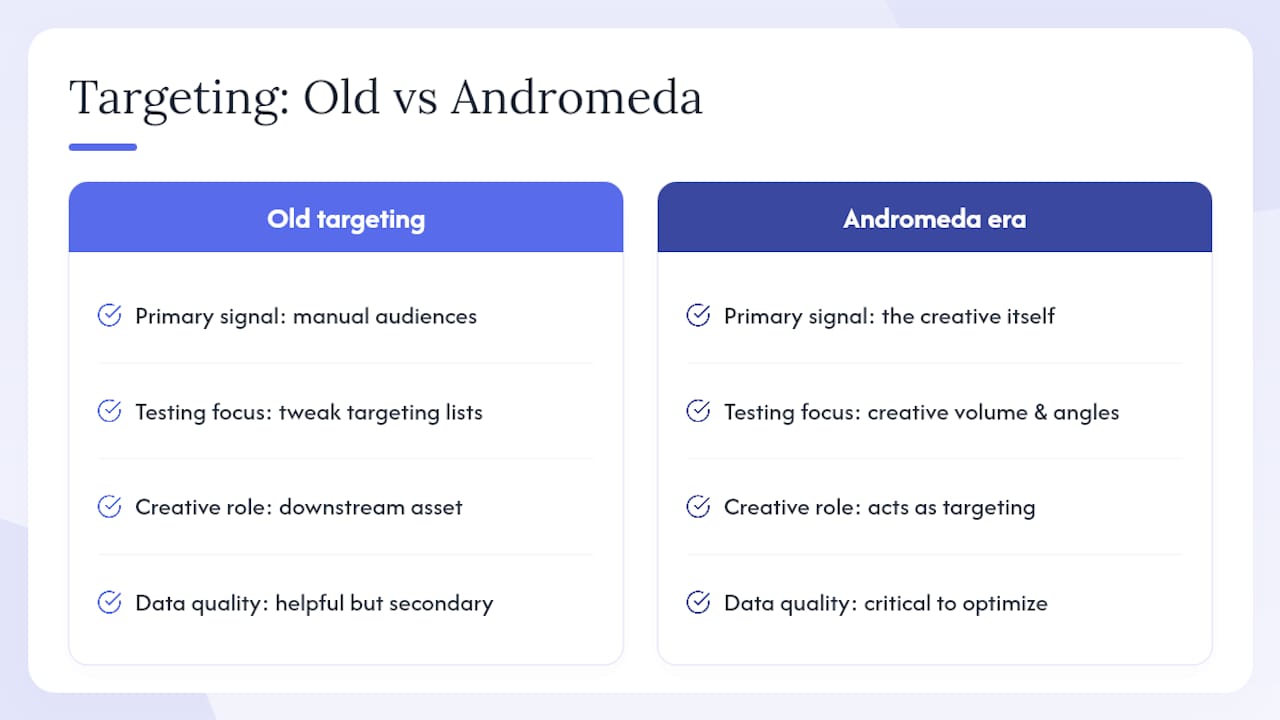
Meta’s retrieval and ranking system, known internally as Andromeda, changed how ads get matched to people. Instead of relying mainly on manual audience definitions, the model increasingly uses the creative itself to figure out who to show it to. That is a real shift in how you should think about testing: the ad copy and visuals are no longer downstream of targeting, they are the targeting.
Practitioner analysis of this shift argues that creative volume and angle diversity have become the primary lever for reaching new audience segments, more so than manual interest or lookalike targeting ever was. That tracks with what I have seen managing accounts at Cosma: campaigns that plateau usually have a creative supply problem, not a targeting problem.
What this actually means for your testing cadence: if creative is targeting, then a thin creative library caps your reach ceiling. Feeding Meta three static images and expecting broad, efficient delivery is the modern equivalent of running one keyword in an old Google Ads account. You need volume, and you need each asset representing a genuinely distinct hook, not five versions of the same idea with different color grading.
This also raises the bar on signal quality. Advantage+ campaigns and dynamic creative both depend on Meta reading your conversion events accurately. If your pixel is misfiring, or your Conversions API setup drops a chunk of purchase events, the algorithm optimizes against a distorted picture of what is actually working. Clean signal now matters more than clever targeting logic, because targeting logic is partly gone. That is the practical implication of the Andromeda-era shift: fix your data pipes before you fix your creative brief.
Expect Meta to ask for more creative than you are used to supplying, and expect the learning phase to take longer if your event volume is thin. Both are direct consequences of a system that leans harder on creative signal and conversion data than the old interest-based targeting model ever did.
Dynamic Creative vs. Advantage+ Catalog Ads: Which One Do You Need?
These solve different problems, and picking the wrong one wastes budget on noisy learning data.
Use component-level dynamic creative when your goal is rapid testing of creative variables, new hooks, new headline angles, new CTA language, before you know what resonates with a cold audience. It is a research tool as much as a scaling tool.
Use Advantage+ catalog ads when your goal is selling from an existing product catalog at volume, and personalization means showing the right SKU to the right shopper rather than testing which headline wins. Meta positions Advantage+ and Flexible Ad Format as the modern path for catalog-driven sales objectives, and several dynamic creative objectives have been narrowed or retired in favor of it.
Account maturity matters here too:
- If you are spending under roughly $1,000 to $2,000 a month with fewer than 50 purchases a week, structured manual or component-level testing usually beats full automation, because there is not enough conversion volume to train the algorithm reliably.
- Once you clear that purchase threshold consistently, Advantage+ Shopping Campaigns become the more efficient default, since the system has enough signal to personalize without excessive noise.
- If you are running a Shopify store, catalog sync friction is minimal, which tips the calculus toward Advantage+ earlier than you might expect.
How to Set Up Dynamic Creative in Meta Ads Manager: Step by Step
Getting this right the first time saves you a wasted week of learning-phase data that never should have been collected.
1. Confirm catalog and pixel prerequisites. Your product catalog needs to be live in Meta Commerce Manager with accurate pricing, availability, and images. If you run Shopify, syncing your catalog through Shopify’s own integration is the fastest path and keeps inventory status current automatically. Verify your Meta pixel is installed and, ideally, backed by Conversions API for redundancy against browser tracking loss.
2. Check your conversion event setup. Make sure Purchase, AddToCart, and InitiateCheckout are all firing and matching in Events Manager.
3. Choose the right campaign objective. For catalog-driven campaigns, select the Sales objective with catalog sales as the destination. For component-level dynamic creative tests unrelated to a catalog, standard Sales or Leads objectives with Advantage+ Creative enabled will apply the same assembly logic to your uploaded assets.
4. Select your product set. Rather than pushing your entire catalog into one ad, segment product sets by category, margin, or bestseller status. This keeps the algorithm focused on comparable items instead of averaging performance across a $20 item and a $200 item.
5. Set budget and structure. Start with campaign budget optimization at a level that can realistically produce 50 conversions in the learning window. If your average order value means that requires more daily spend than you are comfortable with, consider a longer test window instead of underfunding it.
6. Build the ad and confirm asset counts. Upload your images, videos, headlines, descriptions, and CTAs per the specs Meta lists in Ads Manager, then toggle on Dynamic Creative or Advantage+ Creative at the ad level. Check that each placement (Feed, Reels, Stories) has at least one asset formatted for its aspect ratio; a square image getting cropped into a 9:16 Reels slot is a common, avoidable mistake.
7. Run pre-launch QA. Confirm every linked product is in stock, tag your ad with consistent UTM parameters for downstream analytics, and preview the ad across every placement Meta offers before you hit publish.
Pro Tip: Set your UTM structure once, in a template, before you ever touch Ads Manager. Retrofitting tracking parameters after a campaign has been live for two weeks means you lose clean attribution for everything that came before, and that gap tends to show up right when a client or manager asks for a monthly report.
Dynamic Creative Best Practices: Building an Asset Checklist That Actually Works
Volume without structure just produces noisy tests. The goal is enough variation for Meta to find winners, without so much overlap that you cannot tell what actually drove the result.
A workable asset checklist for a standard dynamic creative test:
- 5 to 8 primary visuals (mix of static images and short-form video), each representing a distinct angle rather than a color variant of the same shot
- 4 to 6 headlines, each testing a different value proposition or objection
- 2 to 3 descriptions
- 2 CTA button choices
For video, the first three seconds decide whether the rest gets watched. If your hook is a logo animation or a slow product pan, you are burning your best inventory on an intro nobody sticks around for. Open on the problem, the transformation, or an unexpected visual, not a brand card.
Structure your creative library so each asset maps to one angle and one angle only. Mixing five different value propositions into a single 30-second video makes it impossible to know afterward which idea actually resonated, and it makes Meta’s own component testing less useful because you have baked several variables into one asset.
Refresh cadence should follow performance signals, not a calendar. Watch frequency: once it climbs past 3 to 4 within a seven-day window on a given asset, audience fatigue is setting in and click-through rate typically starts to slide first. That is your cue to rotate in new hooks, not a fixed 30-day reminder.
Pro Tip: Keep a running “angle bank” separate from your live ad account. Every time a customer review, support ticket, or UGC creator mentions a specific benefit or objection, log it. That bank becomes your next round of headline and hook ideas, and it saves you from staring at a blank brief every time performance dips.
How Do You Measure and Optimize Dynamic Creative Performance?
Track ROAS or CPA as your primary decision metric, but do not ignore the secondary signals that explain why those numbers move. Click-through rate tells you whether your hook is working. Hook rate (the percentage of viewers who watch past the first three seconds of video) tells you specifically whether your opening frame is doing its job. Frequency tells you when fatigue, not targeting, is the real problem.
Meta’s learning phase typically requires a sufficient number of conversion events per ad set within a seven-day rolling window to exit cleanly and start optimizing with confidence. Below this threshold, results may stay volatile and could mislead you into killing a creative that just needed more data.
For test discipline:
- Change one variable between test rounds, new hooks, new headlines, or new CTAs, never all three at once, or you will not know what moved the number.
- Use ABO (ad set budget optimization) when you need guaranteed spend distribution across a small set of creative concepts you are actively comparing; switch to CBO once you have identified winners and want Meta allocating budget freely.
- When a creative wins clearly, promote it into your core Advantage+ or CBO campaign rather than leaving it to compete for scraps of budget in a small testing ad set.
If ROAS drops without an obvious cause, work through a short troubleshooting list: check frequency for fatigue, check your catalog for out-of-stock products still running in ads, and check Events Manager for a sudden drop in matched pixel events. That last one catches more people than it should. A tracking issue disguised as a performance problem is one of the most common false alarms I see when reviewing accounts that suddenly stall.
A Practitioner’s Checklist for Launching Dynamic Creative Campaigns
Before I let any account at Cosma go live with a dynamic creative or Advantage+ catalog test, it runs through the same short list. Naming conventions matter more than people expect, tagging each creative with its angle and launch date in the ad name saves hours later when you are trying to figure out which hook actually drove a spike. Group creative by angle inside the ad set structure rather than dumping everything into one undifferentiated pile. Run a conversion sanity check the morning after launch, comparing Events Manager numbers against your actual order dashboard, not just Ads Manager’s reported conversions.
Three mistakes show up constantly in accounts I inspect for the first time. The first is testing five headlines against a single generic image, which tells you almost nothing since the visual is doing all the work anyway. The fix is matching variable counts roughly one to one across components. The second is launching with fewer than three genuinely distinct creative angles and calling it a “test,” when it is really just one idea with cosmetic differences. The third is judging results after 48 hours, well before the learning phase has stabilized, and killing an ad that only needed another five days.
The Real Trade-Offs of Dynamic Creative Nobody Mentions
Dynamic creative earns its reputation for speed. It automates variant testing that would otherwise take weeks of manual ad building, and it personalizes delivery in ways no human media buyer could match one ad set at a time.
The trade-off is control. You cannot always tell Meta “never pair this headline with that image,” which occasionally produces an odd combination live in the wild. Inconsistent asset quality, one polished video next to three phone-shot afterthoughts, produces noisy results that look like a targeting problem but are really an input problem.
- Pros: faster testing cycles, automated personalization, less manual ad-building overhead
- Cons: reduced creative control, unreliable results without conversion volume, some objectives narrowed since 2024
Low-conversion accounts and campaigns built around deprecated objectives are where dynamic creative struggles most. Check current objective support before building a campaign around an older setup.
Why the “Set It and Forget It” Advice Around Dynamic Creative Is Wrong
The most common piece of advice I see repeated about dynamic creative is that it removes the need for creative strategy, just upload assets and let the algorithm handle the rest. That is backwards. Dynamic creative removes the need for manual combination testing. It does not remove the need for a clear point of view about who you are talking to and why they should care.
The accounts that get real lift from Advantage+ and dynamic creative are the ones feeding it a deliberate mix of genuinely different angles, backed by clean conversion data. The accounts that stall are usually feeding it five near-identical assets and blaming the algorithm when nothing separates itself.
If I had to pick one priority for a marketer starting this today, it would not be campaign structure. It would be fixing pixel and Conversions API accuracy before touching a single creative brief. Everything downstream, learning phase speed, Advantage+ personalization, even basic reporting, depends on that signal being clean. Get that right first, then worry about hooks and headlines.
— Stefano Mazzei
How My Team at Cosma Can Help You Run This
Reading a setup checklist and running a profitable dynamic creative program under live budget pressure are two different things. That gap, between knowing the steps and executing them consistently across a growing creative library, is exactly where my team at Cosma spends most of our time with DTC and ecommerce clients across the US and Canada.

We build the creative testing systems, the campaign structures, and the measurement discipline described above, but tailored to your catalog size, your conversion volume, and your actual account history rather than a generic template. If you want to see how that has played out for other ecommerce brands, our case studies walk through real campaign outcomes. If you are ready to talk about your account specifically, you can book a call with our team and we will look at what a dynamic creative or Advantage+ rebuild would actually take for your business.
Sources
- About Dynamic Creative | Meta Business Help Center
- Dynamic Creative Optimization guide for Meta 2026 — Hunch
FAQ
What Is Dynamic Creative in Facebook Ads?
Dynamic creative is a Meta feature that automatically combines your uploaded images, videos, headlines, descriptions, and CTAs into multiple ad variants, then shifts delivery toward the combinations that perform best for each viewer.
What Is Dynamic Creative in Meta Ads Specifically?
It works the same way across Facebook and Instagram placements inside Meta Ads Manager: you supply the component assets once, and Meta’s system assembles and tests the combinations rather than you building each variant by hand.
How Does Dynamic Creative Optimization Actually Work?
Dynamic creative optimization uses your pixel or Conversions API data to identify which asset combinations drive conversions for specific audience segments, then reallocates delivery toward those winning mixes as more data comes in. More advanced third-party DCO tools go further, pairing creative assembly with real-time triggers like inventory levels or weather, something Meta’s native tool does not do on its own.
Can You Really Earn $500 a Day Through Facebook Ads?
Facebook ads can generate significant revenue for ecommerce businesses, but any specific daily earnings figure depends entirely on your product margin, ad spend, and conversion rate. Treat claims of a fixed daily dollar amount from running ads as marketing hype rather than a realistic benchmark, since results vary enormously by account, catalog, and market.
Should I Use Dynamic Creative or Advantage+ Catalog Ads for My Store?
Use component-level dynamic creative when you are testing new creative angles and need rapid comparison data. Use Advantage+ catalog ads once you have consistent purchase volume and want personalized product delivery from your existing catalog at scale.


