
Verify Shopify Facebook Attribution With One Test Order for DTC Brands
They measure different things: Shopify reports completed orders while Meta reports ad-influenced events using its own windows and modeling, so the numbers normally won’t match. Shopify treats a completed order as ground truth. Meta counts anything inside its attribution window, including view-through activity and modeled conversions that never touched your site through a trackable click. The gap is usually attribution model differences, tracking gaps, or a broken Pixel and Conversions API deduplication setup, not fraud or “wasted” spend. Your first move: pull Events Manager Purchase totals and Shopify order totals for the same 7-day window, then run one test order to confirm event_id deduplication is actually working.
TL;DR:
- Different attribution models and tracking gaps cause most discrepancies between Shopify orders and Meta conversions, often unrelated to fraud or wasted spend.
- UTM inconsistencies, stacked scripts, and privacy restrictions frequently lead to underreported or mismatched data across platforms.
- Validating event_id matching, UTM standardization, and testing with a single purchase are critical initial steps to identify tracking issues.
- Fixing pixel and Conversions API deduplication typically reduces most discrepancies, especially when implemented with enforced event_id matching.
- Combining Shopify order data with platform reports and periodic causal testing provides the most reliable picture for cross-channel attribution and budget decisions.
Table of Contents
- How Shopify Attributes Sales To Facebook Traffic
- How Meta Attributes Conversions In Ads Manager And Events Manager
- Why Shopify And Facebook Numbers Actually Diverge
- Audit Checklist: Finding Where Your Tracking Breaks
- Fixes That Actually Close The Gap
- How To Read These Reports Without Getting Fooled
- When Reconciliation Isn’t Enough: A Practitioner’s Take On Incrementality
- Aggregated Event Measurement And What It Does To Your Numbers
- What Facebook Shops Does To Your Attribution Data
- Beyond Events Manager: Other Meta Tools Worth Checking
- Where Shopify’s Native Reporting Falls Short
- Combining Shopify And Facebook Data For Better Decisions
- My Approach To Diagnosing Attribution Problems
- Get Your Attribution Fixed Instead Of Guessing At It
- Key Docs And Explainers Worth Bookmarking
- Sources
- FAQ
How Shopify Attributes Sales To Facebook Traffic
Shopify’s reporting engine is built around one question: what channel gets credit for an order? You’ll find that answer inside Analytics > Reports > Customer Orders by Marketing Channel, alongside the broader Marketing reports dashboard, which is where most store owners first notice the discrepancy against their ads dashboard.
Shopify supports several attribution models, and which one you’re looking at changes the story completely:
- Last click credits whichever channel the customer clicked immediately before purchasing, even if Facebook introduced them three weeks earlier.
- Last non-direct click ignores direct visits and credits the last identifiable marketing channel, which tends to be more generous toward paid social.
- First click credits the channel that started the relationship, useful for measuring top-of-funnel impact but often invisible in short reporting windows.
- Any click / linear spreads credit across every touchpoint in the path, which is the closest Shopify gets to multi-touch thinking natively.
Here’s the part that trips people up: Shopify’s marketing reports only attribute “Sales attributed to marketing” for traffic the store can directly trace, meaning UTM-tagged links or connected marketing apps. If a customer clicks your ad on their phone, closes the app, and buys later on desktop with no UTM in the URL, Shopify logs that as Direct or N/A. It’s not wrong. It genuinely couldn’t see the ad interaction. This is one of the most common reasons Facebook shows a sale that Shopify seems to bury under “Direct” traffic, and it has nothing to do with either platform lying to you.
How Meta Attributes Conversions In Ads Manager And Events Manager
Ads Manager and Events Manager answer two different questions, and conflating them is where a lot of account audits go sideways. Ads Manager tells you what Meta’s algorithm believes drove results, weighted by attribution settings you (mostly) control. Events Manager tells you whether the raw purchase events firing into Meta actually match what happened on your site.
Meta’s attribution windows determine how far back it will look and how much credit view-only exposure gets:
- Click-through windows (commonly 7-day) credit a purchase to an ad if the customer clicked within that stretch of time.
- View-through windows (commonly 1-day) credit a purchase even if the customer never clicked, just saw the ad and later converted.
- Modeled conversions fill gaps where Meta can’t directly observe an event, using statistical estimation based on comparable users.
Shopify’s own explainer on marketing attribution notes that Meta’s view-through credit and default windows are exactly why Ads Manager can attribute conversions that Shopify’s backend never sees as ad-driven. A shopper who scrolled past your ad, didn’t click, and bought two days later through organic search still counts as a Meta conversion under a 1-day view window.
The number that matters more than your daily conversion count: Event Match Quality (EMQ). Events Manager scores how well your purchase events match real Facebook accounts, based on parameters like email, phone, and click IDs. A low EMQ score means Meta is guessing more and matching less, which inflates both under and over counting depending on the day.
This is why Events Manager, not Ads Manager, is where you validate whether tracking itself is healthy. Ads Manager is a campaign optimization tool wearing a reporting costume. Events Manager is where you check event accuracy, deduplication status, and parameter completeness before you trust a single number in either dashboard.
Why Shopify And Facebook Numbers Actually Diverge
Four things cause almost every mismatch I’ve seen across ecommerce accounts, and none of them require conspiracy theories about Meta inflating numbers on purpose.
- Different attribution models and time windows. Shopify’s last-click default and Meta’s blended click-plus-view window are structurally built to disagree. A 7-day click, 1-day view setting on Meta will almost always report more purchases than a strict last-click model in Shopify, because Meta is counting exposure Shopify can’t see or doesn’t count the same way.
- Tracking blockers you can’t fully control. iOS App Tracking Transparency limits device-level signal, ad blockers strip pixel calls before they fire, and browser privacy settings (Safari’s Intelligent Tracking Prevention, Firefox’s Enhanced Tracking Protection) quietly drop cookies that link a click to a purchase. Express checkout flows (Shop Pay, Apple Pay, Google Pay) sometimes hand off to a payment domain that loses the original referrer entirely.
- UTM inconsistency fragments your own data. Shopify’s UTM parameters are case-sensitive, so
utm_source=Facebookandutm_source=facebookshow up as two separate, smaller channels instead of one accurate total. This single habit quietly understates your best channel more often than any tracking bug does. - Stacked scripts and missing deduplication IDs. If your Pixel fires in the theme, in a third-party app, and again through a tag manager, you can double count the same purchase three times. Server-side Conversions API events without a matching event_id compound the problem instead of fixing it.
These four causes explain the overwhelming majority of the gaps I’ve dug through in client accounts, and they’re compounding: a store with case-sensitive UTMs and stacked pixels isn’t looking at one small error, it’s looking at two errors multiplying each other.
Pro Tip: Event deduplication errors are one of the sneakiest, most common issues in Meta accounts. Place one real test order, then check Events Manager’s “Test Events” tool to confirm the browser Pixel and server Conversions API sent the identical event_id for that purchase. If they don’t match, you’re double counting, quietly, on every sale.
Audit Checklist: Finding Where Your Tracking Breaks
Run this before you touch a single budget or bid strategy. Most “Facebook is lying to me” panics resolve in under an hour once you follow these steps in order.
-
Pull a 7-day comparison. Compare Meta Events Manager’s Purchase count against Shopify’s order count for the identical seven-day window. Practitioner consensus favors weekly or 30-day windows over day-by-day comparisons, since daily noise from timezone cutoffs and delayed event processing makes single-day deltas meaningless.
-
Place one live test purchase. Buy something small from your own store, then find that exact transaction in Events Manager.
-
Verify the parameters that matter most.
- Confirm the event_id on the browser Pixel event matches the event_id on the server-side Conversions API event for that same order.
- Check that
fbcandfbpcookies are present and populated, not blank. - Look at the EMQ score for that specific event, not just the account average.
-
Check for duplicate scripts. Open your theme code, your tag manager container, and any marketing app installed in the past year. More than one Pixel firing the same PageView or Purchase event is a common, quiet cause of inflated numbers.
-
Audit UTM governance. Pull every unique
utm_sourceandutm_mediumvalue from the last 90 days and check for case mismatches, typos, or inconsistent naming between paid, email, creator, and affiliate links. -
Inspect the checkout handoff. If you use Shop Pay, Apple Pay, or an embedded express checkout, click through it yourself and watch whether the referrer or UTM parameters survive the domain switch.
-
Build a daily reconciliation sheet. Log ad spend, Meta reported conversions, GA4 sessions, and Shopify orders side by side every day for two weeks before drawing conclusions.
Two weeks of clean logs will tell you more than two hours of dashboard-refreshing ever will.
Fixes That Actually Close The Gap
Once the audit tells you where the break is, the fixes are mostly mechanical, not strategic. Here’s what closes the gap reliably, in order of impact.
- Implement Pixel plus Conversions API together, with enforced event_id matching. This single fix resolves more discrepancy cases than anything else on this list. Server-side events don’t depend on a browser cookie surviving, which makes them resilient to ad blockers and iOS privacy restrictions.
- Standardize UTM naming across every channel that touches your store. Lowercase everything. Agree on one naming convention (
utm_source=facebook, neverFacebookorFB) and enforce it across paid social, email platforms, creator link programs, and affiliate tools. - Switch to click-based attribution if view-through inflation is skewing decisions. If Ads Manager numbers consistently run far ahead of Shopify orders, a 7-day click, no view-through setting gives you a more conservative, more comparable number, even if it looks smaller on the surface.
- Set a fixed reconciliation cadence. Weekly is the minimum; monthly catches slower seasonal drift. Tie every reconciliation to Shopify orders as the outcome metric, never to platform-reported conversions summed across channels.
- Know when to call in a developer. Express checkout referrer loss, server-side proxy setups, and multi-app deduplication conflicts are not spreadsheet problems. If your test order still shows deduplication errors after the basics are fixed, that’s the signal to bring in technical help rather than keep guessing at settings.
Pro Tip: Cosma’s implementation of Pixel + Conversions API relies on matching event_id ties directly to how Meta scores Event Match Quality. A store that fixes deduplication often sees EMQ climb within days, which on its own can make Ads Manager numbers look “better” even before you change a single campaign.
How To Read These Reports Without Getting Fooled
The single most useful mental shift I can offer: stop treating Shopify and Meta as competing scorekeepers. They’re not scoring the same game.
Shopify orders are your business truth. Revenue, customer records, and inventory decisions should always trace back to Shopify, never to a platform’s self-reported conversion count. Ads Manager exists to help you optimize within Facebook, comparing one campaign or audience against another on Meta’s own terms. It was never designed to hand you an accurate cross-channel revenue figure.
That distinction changes how you should build your reporting habits:
- Use Ads Manager for within-platform decisions: which creative wins, which audience converts cheaper, which placement to scale.
- Use Shopify orders for outcome measurement: how much revenue actually landed, and from which customers.
- Use experiments or causal methods, covered further down, for cross-channel budget allocation decisions, since no single platform’s dashboard can honestly answer “what would happen if I moved $10,000 from Meta to email?”
Never sum conversions across Ads Manager, Google Ads, and email platform reports and expect that total to mean anything. Each platform’s model double-dips into shared touchpoints, so adding them together doesn’t produce a bigger truth, it produces a bigger error. Build a simple reconciliation table instead: one row per week, columns for Shopify orders, Meta reported purchases, the attribution window used, and the model applied. Patterns emerge fast once you’re comparing apples to apples across a full week or month rather than chasing daily swings that are mostly noise.
When Reconciliation Isn’t Enough: A Practitioner’s Take On Incrementality
Fixing tracking and reconciling reports solves the “why don’t these numbers match” problem. It does not solve the “should I move budget from Meta to TikTok” problem, and conflating the two is where I see smart operators waste months.
If you’re running one or two paid channels on a modest budget, tracking fixes and a weekly reconciliation sheet are genuinely enough. You don’t need incrementality testing to know whether Facebook is working when it’s your only acquisition channel and Shopify orders are climbing alongside spend.
The calculation changes once you’re running Meta, Google, TikTok, and affiliate simultaneously at real spend levels. At that point, platform-reported conversions from each channel are all claiming partial credit for the same customers, and no amount of tracking cleanup resolves that overlap. This is where causal attribution earns its keep: it asks what revenue you’d have generated without a given channel, rather than which platform’s pixel fired last.
The real decision rubric I use with clients: does fixing tracking change what you’d do with next month’s budget? If yes, fix tracking first. If the honest answer is “no, I’d still split spend the same way regardless of which number is right,” you’ve outgrown reconciliation and need incrementality testing or geo-holdout experiments to make the call with confidence.
Pro Tip: Run a two-week Meta spend holdout in a comparable geographic segment before committing to a full incrementality program. It’s a rough signal, not a scientific one, but it’s often enough to tell you whether the investment in proper causal testing is worth it for your revenue scale.
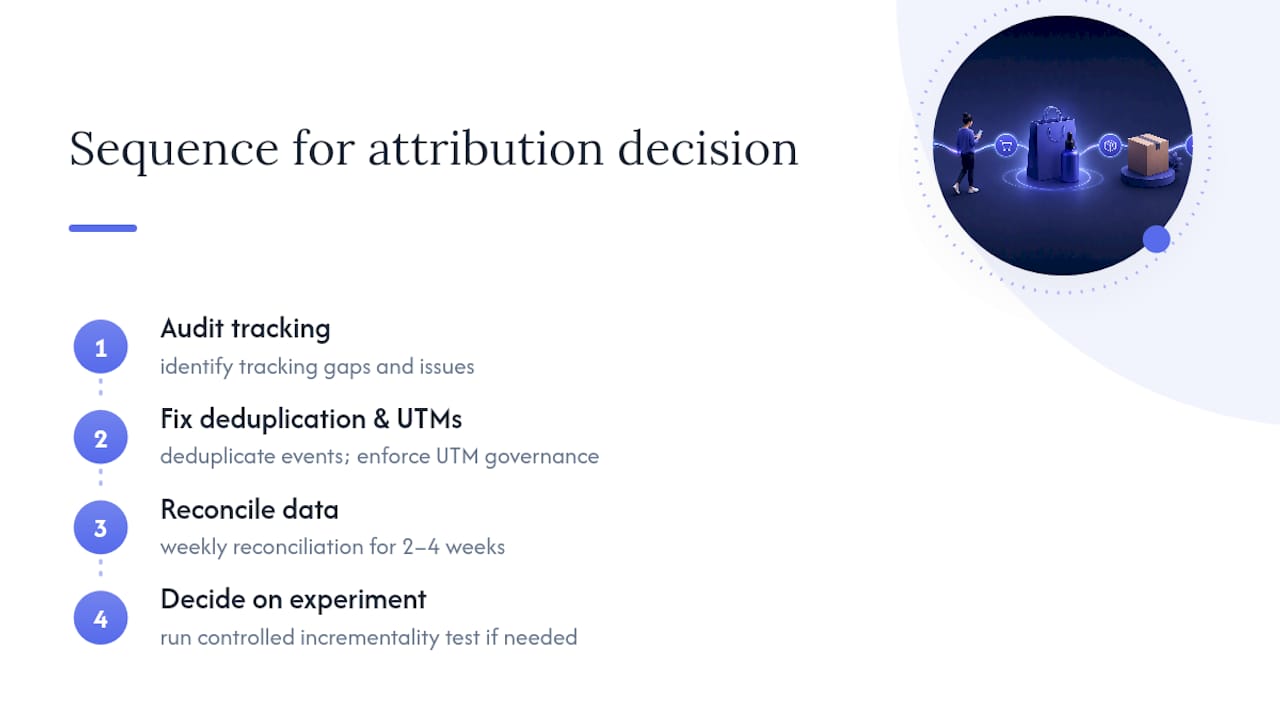
The sequence my team at Cosma follows with clients is always the same: audit tracking, fix deduplication and UTM governance, reconcile for two to four weeks, then decide whether the remaining uncertainty justifies a controlled experiment. Skipping straight to incrementality testing on broken tracking data just gives you a more expensive version of the same wrong number.
Aggregated Event Measurement And What It Does To Your Numbers
Apple’s App Tracking Transparency forced Meta to build Aggregated Event Measurement (AEM), a framework that limits each domain to a capped number of prioritized conversion events and reports them with delay and statistical modeling rather than raw counts. Purchase almost always sits at the top of most stores’ priority list, which is the right call, but it means the data behind that number is smoothed, not exact.
The practical effect: expect a reporting lag of up to three days on some events, and expect Ads Manager numbers to lean on modeled estimates for any user who opted out of tracking on iOS. Modeling isn’t guessing at random, Meta uses observed data from consenting users to estimate behavior for those who opted out, but it does mean the confidence interval on your numbers is wider than it looks on a clean dashboard.
This is also why Conversions API server events matter more under AEM than they did before it existed. Server-side events aren’t subject to the same device-level consent restrictions, so they give Meta a more complete signal to model against. A store still relying only on browser Pixel data is handing Meta a thinner dataset to work with, which shows up as more modeling, wider variance, and bigger gaps against Shopify’s exact order count.
What Facebook Shops Does To Your Attribution Data
Facebook Shops adds a second checkout surface, and depending on how it’s configured, that surface can either sync cleanly with Shopify or create an entirely separate order trail that muddies your reconciliation.
If Shops is set up to redirect checkout back to your Shopify store, the purchase completes on your domain and gets tagged with standard Shopify order data, UTMs included when the handoff preserves them. That’s the cleaner configuration for attribution purposes. If Shops uses native checkout on Facebook’s own surface instead, the order can complete without ever touching your Shopify checkout flow directly, which means Shopify’s marketing reports may show a lower attributed total than what actually happened, because the transaction path looks different to Shopify’s tracking logic than a standard ad click through to your storefront.
The fix is procedural, not technical: know which checkout mode your Shops integration uses, and factor that into your reconciliation table as its own row rather than folding it into general “Facebook Ads” traffic. Treating Shops-driven orders as identical to standard paid social clicks will quietly distort your channel-level math, especially for stores where Shops volume is meaningful relative to total paid traffic.
Beyond Events Manager: Other Meta Tools Worth Checking
Events Manager tells you whether your pixel and Conversions API events are healthy. It doesn’t tell you much about audience behavior, creative fatigue, or where a customer actually dropped off before converting, and that’s where a few adjacent Meta tools earn a look.
Ads Manager’s Breakdown feature lets you slice conversion data by placement, device, and age/gender segments, useful for spotting whether your attribution gap concentrates in one placement (Reels often shows different tracking reliability than Feed) rather than spreading evenly across your account.
Meta’s Attribution tool, where still available to an ad account, offers a cross-channel view that includes non-Meta touchpoints when connected properly, giving a rough multi-touch picture that neither Ads Manager nor Shopify alone can produce.
Test Events inside Events Manager deserves more use than most accounts give it. It’s the fastest way to confirm a live purchase fired correctly on both browser and server side before you trust any aggregate number that week.
None of these replace Shopify orders as your outcome metric. They exist to help you diagnose why the ad-side numbers look the way they do, which is a different job than measuring what actually sold.
Where Shopify’s Native Reporting Falls Short
Shopify’s Marketing reports are genuinely useful for single-touch, last-click style questions. They’re not built to answer multi-touch questions, and pretending otherwise leads to bad budget calls.
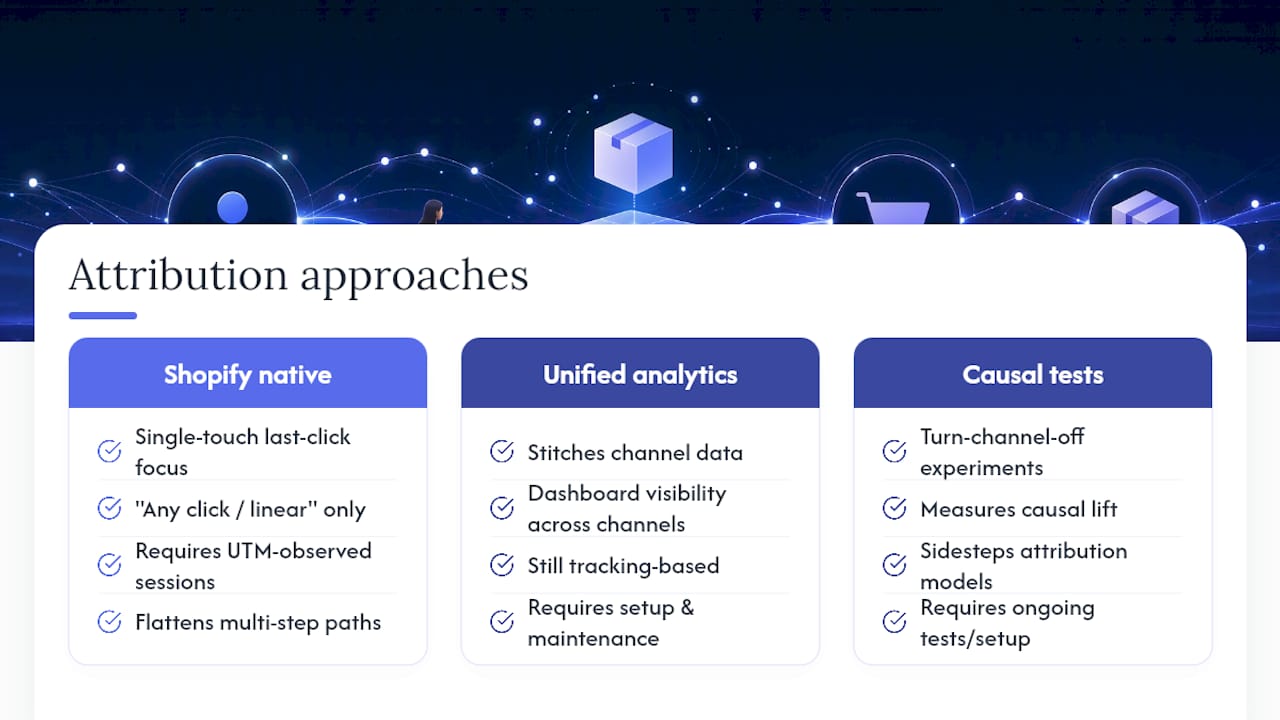
The “any click / linear” model comes closest to multi-touch logic natively, but it still relies entirely on UTM-tagged sessions Shopify can actually observe. A customer path that includes an Instagram Story view, a Google search a week later, and a direct visit to purchase gets flattened into whatever single touchpoint carried a trackable UTM, if any did. Shopify has no mechanism to weight partial credit across a real multi-touch journey the way a dedicated multi-touch model would.
For stores running three or more paid channels seriously, that’s a real limitation. The alternatives fall into two camps: third-party unified analytics platforms that stitch together channel data into one dashboard, which is useful for visibility but still tracking-based underneath, or causal measurement approaches that sidestep the attribution question entirely by testing what happens when a channel is turned off. Neither is “installed and done.” Both require ongoing setup and interpretation, but for a store spending real money across multiple channels, the visibility gap Shopify’s native reports leave open is worth closing with one of them.
Combining Shopify And Facebook Data For Better Decisions
The most reliable setup I’ve seen combines three layers instead of trusting any single dashboard: backend orders from Shopify as the outcome truth, platform reports for within-channel optimization, and periodic causal testing for cross-channel budget calls.
In practice that looks like a recurring reconciliation table (Shopify orders, Meta reported purchases, the attribution window and model used that week) sitting alongside a lightweight incrementality check run every quarter or after any major budget shift. Unified third-party analytics platforms that pull Shopify and ad-platform data into one view can help visualize the reconciliation, but they’re still summarizing tracking data underneath, so they inherit the same view-through and modeling quirks as Ads Manager itself.
The practical takeaway: don’t chase a single “true” attribution number. Attribution differences are structural, not fixable through better software alone, because each platform’s model answers a slightly different question by design. Standardize on Shopify orders for the business number, use platform reports for optimization inside each channel, and reserve causal or experimental methods for the moments when real money is riding on a cross-channel decision.
My Approach To Diagnosing Attribution Problems
I diagnose tracking before I touch a single campaign or budget line, every time. Nine times out of ten, a client’s “Facebook is lying to us” concern turns out to be a deduplication error, a case-sensitive UTM, or an express checkout handoff quietly dropping the referrer.
My team at Cosma runs the same sequence on every account: verify Pixel plus Conversions API deduplication, audit UTM governance across every channel touching the store, reconcile Shopify orders against Events Manager over a full week, and only then look at whether incrementality testing is worth the investment. Fixing tracking first isn’t caution for its own sake. It’s the only way to know whether a “problem” is real or just two systems counting differently.
— Stefano Mazzei
Get Your Attribution Fixed Instead Of Guessing At It
Most stores lose weeks chasing a discrepancy that a proper audit resolves in a single sitting, and that’s the gap a specialized performance marketing team can close for DTC and ecommerce brands scaling paid social.

We audit your Pixel and Conversions API setup, verify event_id deduplication on real transactions, clean up UTM governance across every channel, and build the reconciliation process that tells you whether your numbers are actually broken or just measuring different things. When the account has outgrown simple reconciliation, we design incrementality tests to answer the budget questions platform dashboards can’t. If you’re comparing Shopify orders against Ads Manager and not sure which number to trust, book a diagnostics call with my team at Cosma and we’ll walk through your specific setup. Curious what this looks like in practice first? Our case studies cover how we’ve untangled attribution and scaled spend for brands facing the exact same mismatch.
Key Docs And Explainers Worth Bookmarking
For readers who want to go straight to the source, Shopify’s marketing reports documentation covers attribution models and UTM handling in detail, while Shopify’s own attribution explainer breaks down Meta’s view-through and click windows in plain language.
For deduplication setup specifically, the Pixel plus Conversions API walkthrough covers event_id matching step by step. On tracking-versus-attribution fundamentals, the Aimerce explainer and Cosma’s partner resource on converting existing traffic are both worth a slower read when you’re building your reconciliation cadence.
Sources
- Shopify help — Marketing reports
- Shopify blog — Marketing attribution
- Meta Ads tracking and attribution: how to set it up right
- Shopify attribution: complete guide (Causality Engine)
FAQ
Why Do People Use Shopify Instead Of Just Selling On Facebook?
Shopify gives you ownership of customer data, inventory, and payment processing, none of which you control when selling exclusively through a Facebook-native checkout. It also lets you run multiple acquisition channels against one backend order system, which is exactly what makes cross-channel reconciliation possible in the first place.
Is $10 A Day Enough For Facebook Ads?
It can generate learning data and early signal for a small, well-targeted audience, but at that spend level, expect meaningful daily noise and slower exit from Meta’s learning phase. Reconciling against Shopify orders matters even more at low budgets, since a single misattributed sale swings your numbers proportionally more than it would on a larger account.
Can Shopify Integrate With Facebook?
Yes, through the Facebook Sales Channel app, which connects your product catalog to Facebook Shops and enables Pixel and Conversions API tracking directly from your Shopify admin. That integration is also where checkout configuration determines whether Shops orders route back through Shopify’s standard attribution or create a separate tracking path.
How Much Does Shopify Take From A $20 Sale?
Shopify’s transaction fees depend on your specific plan and whether you use Shopify Payments, so the exact deduction varies by merchant. Current plan and fee details are listed on Shopify’s own pricing page rather than a fixed universal figure.


