Add $0.25–$0.50 Per Order With Post-Purchase Ads: Practitioner Tests
Post-purchase ads are offers served on the confirmation or receipt page right after checkout, when the customer is still logged in, still paying attention, and still in a buying mindset. Done well, they add incremental revenue per order and lift lifetime value without touching your acquisition budget. The rest of this guide covers the tactics, the setup, and the measurement that make that promise real.
TL;DR:
- Showing post-purchase ads on the confirmation page can generate an average of 25 to 50 cents in profit per transaction, with higher gains depending on category and relevance.
- Prioritize upsell and cross-sell offers immediately after purchase for durable goods and high-value items, while reserving refills, loyalty, and referral prompts for follow-up periods.
- Proper setup requires accurate data feeds, hashed identifiers, and exclusion lists to avoid wasting ad spend on recent buyers or mismatched SKUs.
- Clear, reward-based offers with a single CTA outperform generic discounts, and testing reward framing against discounts can reveal higher conversion rates.
- Measurement of true incremental revenue involves holdout tests with a non-exposed control group and comparing repeat purchase rates over 30 days.
Table of Contents
- What Are Post-Purchase Ads and Why Does the Confirmation Page Convert?
- Which Post-Purchase Ad Tactics Should You Run First?
- How Do You Set Up Post-Purchase Ads Technically?
- What Creative and Timing Actually Convert on the Confirmation Page?
- How Do You Measure Incremental Revenue From Post-Purchase Ads?
- What Mistakes Kill Post-Purchase Ad Performance?
- A Practitioner’s Post-Purchase Testing Framework
- Where Should You Start With Post-Purchase Advertising?
- How My Team at Cosma Builds Post-Purchase Ad Systems
- Where to Go Deeper on Post-Purchase Ad Setup
- Sources
- FAQ
What Are Post-Purchase Ads and Why Does the Confirmation Page Convert?
The confirmation page is the most underused real estate in ecommerce. A customer just entered their card details, confirmed shipping, and clicked “place order.” Their guard is down and their attention is fully on the screen, unlike a social feed where you’re fighting for a glance between texts and videos.
That moment also hands you something valuable: fresh first-party transaction data. Email, order value, SKU, category, even payment method. That data is far more precise than a cold pixel fire, and it makes your lookalike audiences and dynamic offers sharper across the board, which is exactly why eMarketer’s analysis of post-purchase targeting points to checkout attention and first-party data as the two forces behind post-purchase performance.
Post-purchase ads generate $0.25 to $0.50 in incremental profit per transaction on average, according to Fluent’s post-purchase advertising playbook, with individual retailer cases running higher depending on category and offer relevance. That’s not a rounding error at scale. On 50,000 monthly orders, even the low end of that range is real revenue that never touched a media budget.
Which Post-Purchase Ad Tactics Should You Run First?
Not every tactic fits every product. A consumable brand and a furniture brand need different playbooks, and running the wrong one wastes the best attention window you’ll get all year.
- Upsell: Show a premium version or bundle of what they just bought, timed at zero delay on the confirmation page itself. Sample offer: “Add the pro version for $12 more, ships together.” Best for durable and mid-AOV goods where margin supports a bundle.
- Cross-sell: Recommend a complementary SKU based on the order’s category, shown immediately after the upsell slot. One-liner: “Complete the set.” Works across nearly every vertical, but ROI is highest on apparel and beauty.
- Repurchase/refill: Trigger this one on a delay tied to product lifespan, not on the confirmation page. A 30-day supplement gets a nudge at day 25, not day zero. Offer: “Set up auto-refill and save 10%.”
- Loyalty: Invite enrollment right after purchase, when the customer already trusts you enough to hand over money. Sample CTA: “Join and earn points on this order too.”
- Referrals: Ask post-purchase, not post-delivery. Satisfaction is assumed, not yet tested. CTA: “Give $10, get $10.”
- Product education: Best for anything with a learning curve. Video or a quick-start guide beats another discount offer.
Prioritize by expected return: consumables win with repurchase and loyalty, durables win with upsell and cross-sell, and high-AOV items do better with education than with another discount.
How Do You Set Up Post-Purchase Ads Technically?
The tactics only work if the data plumbing is right. Get this wrong and you’ll show a refill offer to someone who already refilled, or worse, hit a purchaser with the same acquisition ad you served them yesterday.
- Placement: Fire a lightweight JavaScript tag on the confirmation/thank-you page, and mirror it with a mobile SDK event if you have an app, so web and app purchasers get the same suppression logic.
- Data payload: Send hashed email, order ID, SKU list, category, and price with every event. Google Ads’ dynamic remarketing setup requires this level of detail to personalize ads against your catalog rather than showing generic creative.
- Feeds: Upload a product feed in .csv or .xlsx format to Merchant Center, and keep SKU IDs mapped one-to-one with your order payload so dynamic ads pull the right item every time.
- Privacy and exclusions: Use hashed identifiers, not raw emails, and build purchase exclusion lists so recent buyers drop out of acquisition campaigns immediately. Layer in frequency caps and category allow/deny lists so a customer who bought a mattress doesn’t see mattress ads for the next month.
Feed hygiene matters more than most teams expect. If your category taxonomy is inconsistent, allow/deny logic breaks silently, and you won’t notice until conversion rates quietly slide.
What Creative and Timing Actually Convert on the Confirmation Page?
The paradox of choice is real here. Show a customer five offers on a receipt page and conversion drops, because deciding what to click competes with the relief of “order placed.” One clear offer beats a menu every time.
- Frame the offer as a reward, not a discount. “You’ve unlocked free shipping on your next order” performs better than “10% off,” even at similar margin cost, based on the reward framing eMarketer highlights as a driver of post-purchase engagement.
- Use a native slot embedded in the confirmation page layout rather than a modal that interrupts the “your order is confirmed” moment. It should look like part of the receipt, not an ad that got bolted on.
- Keep the CTA to a single action: “Add to order” or “Save my spot,” never a page of options.
- Reserve immediate offers for upsells and cross-sells that make sense right now. Push repurchase, education, or loyalty nudges to a 48 to 72 hour follow-up instead of cramming everything onto one page.
Pro Tip: Test the reward-framed offer against a straight discount on the same audience for two weeks. The lift usually shows up in conversion rate, not average order value, so don’t judge the test on revenue alone.
How Do You Measure Incremental Revenue From Post-Purchase Ads?
Platform-reported conversions overstate impact because they credit ads for purchases that would have happened anyway. The fix is a holdout, not better dashboards.
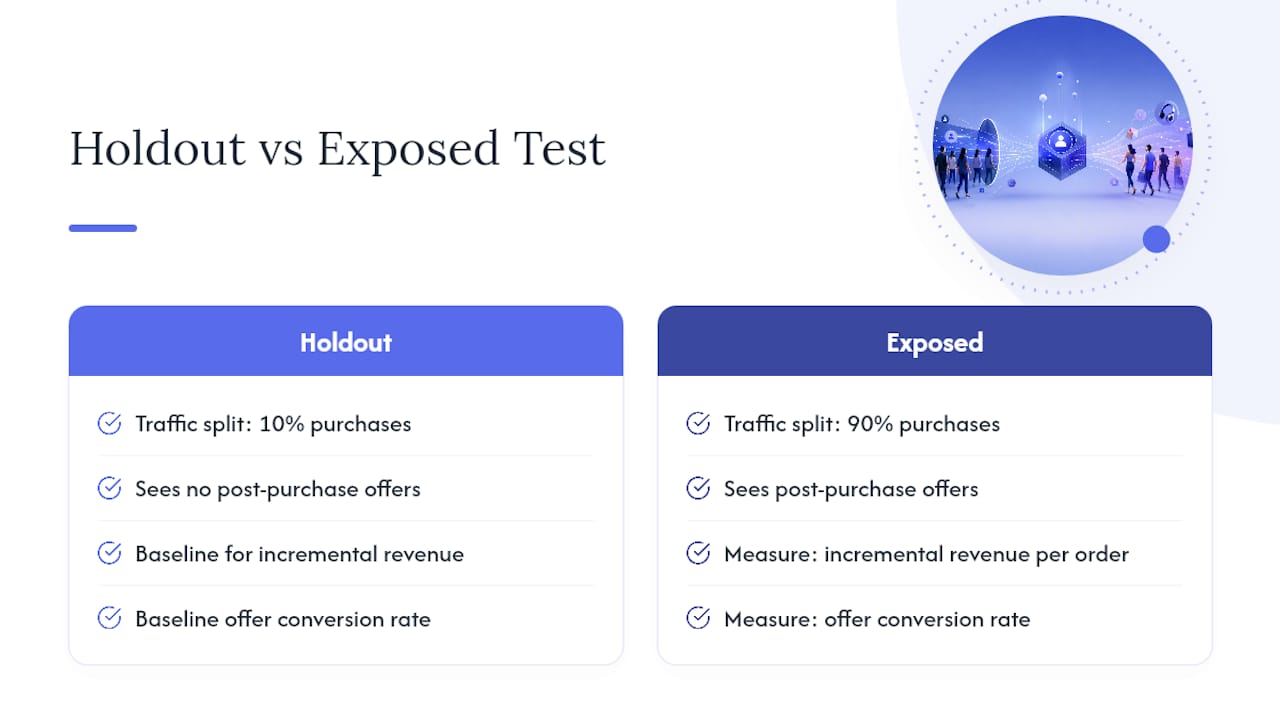
Track four numbers: incremental revenue per order, conversion rate on the offer itself, ROAS calculated only against the incremental spend, and LTV uplift over 60 to 90 days. To isolate the real lift, WebMedic’s ecommerce retargeting guide recommends splitting 10% of purchase traffic into a holdout that sees no post-purchase offers for 30 days, then comparing incremental revenue per order and repeat purchase rate against the exposed group using bootstrapped confidence intervals. Watch the gap between view-through and click attribution too. Platform numbers and server-side reconciliation rarely match exactly, and the difference tells you how much of your reported lift is real.
What Mistakes Kill Post-Purchase Ad Performance?
Most underperforming programs fail for the same handful of reasons, and every one is fixable before launch rather than after the fact.
- No purchase exclusions. Showing acquisition ads to someone who just bought wastes spend and annoys the customer.
- Overcomplicated offers. Multiple choices on one page kill conversion through decision fatigue.
- Stale creative. An offer that ran unchanged for three months stops converting long before anyone notices.
- Broken feed hygiene. Mismatched SKU IDs between your order payload and product feed quietly break dynamic personalization, a fix Google’s dynamic remarketing documentation treats as a baseline requirement, not an optional step.
- No creative rotation schedule. Set a fixed cadence, segment by purchase category, and enforce frequency caps before you scale spend.
A Practitioner’s Post-Purchase Testing Framework
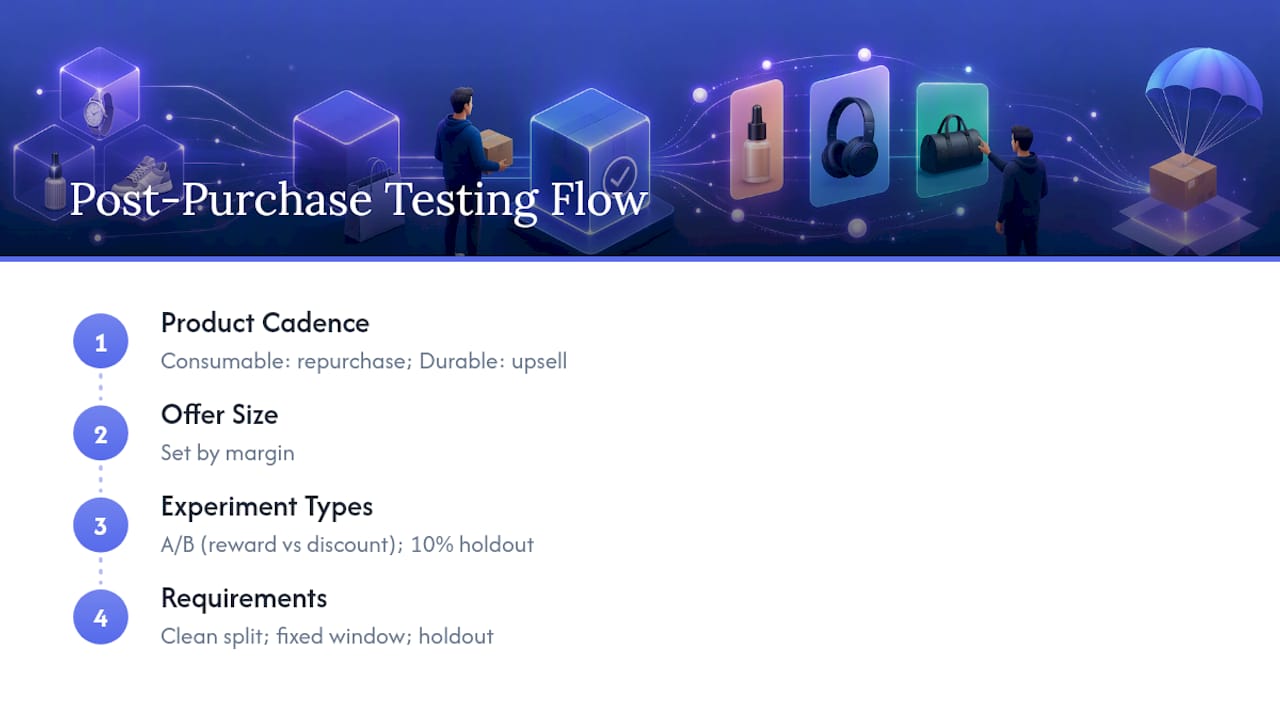
At Cosma, the framework starts with product cadence. Consumable products get repurchase and loyalty tests; durable and high-AOV products get upsell and cross-sell tests. From there, offer size follows margin, not guesswork.
Two recipes I run with clients: an A/B creative rotation comparing reward framing against discount framing over two weeks, and a 10% holdout experiment measured over 30 days. Both need a clean audience split and a fixed measurement window before you touch spend.
Pro Tip: Run the holdout test before you scale any single tactic past your top two categories. It’s the only way to know if the “lift” you’re seeing is real or just attribution noise.
Where Should You Start With Post-Purchase Advertising?
If you’re implementing this for the first time, sequence matters more than sophistication. Start with a 10% holdout so you have a real baseline. Deploy one low-friction upsell on your highest-volume SKU before touching anything else. Track incremental revenue per order for a full 30 days before deciding what to scale.
If you’d rather have my team at Cosma run the audit or build the experiment for you, our case studies show how this plays out across real ecommerce accounts.
— Stefano Mazzei
How My Team at Cosma Builds Post-Purchase Ad Systems
Most brands lose the confirmation-page moment to a generic “thank you” screen and a missed opportunity, not because the tactic is hard, but because nobody owns the integration, the creative testing, and the measurement at the same time. That’s the gap my team at Cosma closes.

We handle the confirmation-page integration, build and test the upsell and cross-sell creative, and run the holdout experiments that tell you what’s actually incremental versus what platforms are claiming. If you run a DTC or ecommerce brand in the US or Canada and want a second set of eyes on your post-purchase setup, book a call with my team at Cosma and we’ll walk through what’s realistic for your catalog and order volume.
Where to Go Deeper on Post-Purchase Ad Setup
A few resources worth bookmarking as you build:
- Google Ads dynamic remarketing docs for feed formats and Customer Match setup.
- Fluent’s post-purchase advertising playbook for benchmark data and integration guidance.
- HubSpot’s retargeting guide for common campaign mistakes and fixes.
Sources
- Why advertisers are winning by targeting the post-purchase moment
- Post-Purchase Advertising Playbook: Take Your Customer Journey to the Next Level
- Dynamic remarketing for websites — Google Ads Help
- Ecommerce retargeting: Ad sequence guide | WebMedic
FAQ
What Are Examples of Post-Purchase Ads and Behavior?
Common examples include a refill reminder for a 30-day supplement, a loyalty enrollment prompt on the receipt page, and a cross-sell for a matching accessory. Post-purchase behavior itself covers everything from repeat purchase rate to referral activity after the first order.
What Does “Post-Purchase” Mean in Marketing?
Post-purchase refers to everything that happens after a customer completes checkout, including confirmation-page offers, follow-up emails, refill nudges, and loyalty or referral prompts aimed at increasing lifetime value.
What Is the Ideal Timing for a Post-Purchase Offer?
Show upsells and cross-sells immediately on the confirmation page, since that’s when checkout attention is highest, and reserve repurchase, education, or loyalty nudges for a 48 to 72 hour follow-up window.
How Do You Measure Incremental Revenue From Post-Purchase Ads?
Run a 10% holdout that sees no offers for 30 days, then compare incremental revenue per order and repeat purchase rate against the exposed group rather than trusting platform-reported conversions alone.
Can Post-Purchase Ads Replace Retargeting or Email Marketing?
No. Post-purchase ads work best alongside email flows and standard retargeting, since coordinating channels recovers more revenue than any single channel running on its own.


