DTC 2026: Meta Lookalike Audiences as Precision Seeds for Advantage+
Lookalike audiences on Meta are still worth building in 2026, but only when you feed them the right seed. If your data is thin, generic, or unreliable, Advantage+ Audience will usually beat a manual lookalike without the setup work. If you have clean, value-based first-party data (repeat buyers, high-LTV customers, offline CRM lists), a manual lookalike gives you control that automation still can’t fully replicate.
TL;DR:
- Building a high-quality seed with at least several thousand customers is crucial, especially when using value-based targeting for better results.
- Using a 1% lookalike audience achieves the closest match but limits reach; expanding to 3% or 5% balances precision and volume depending on campaign goals.
- Manual lookalikes are still valuable for offline data, new markets, or when detailed control over high-LTV segments is necessary, especially with thinned or incomplete seed data.
- Advantage+ Audience often outperforms manual lookalikes in accounts with strong conversion signals, but manual audiences remain relevant for specialized or low-volume segments.
- Regular seed refreshes, creative updates, and controlled percentage increments can prevent audience decay, allowing effective scaling and accurate attribution.
Table of Contents
- What a Meta Lookalike Audience Actually Is
- How Advantage+ Changed What Manual Lookalikes Are For
- Building a Seed That’s Actually Worth Modeling
- Creating a Lookalike in Ads Manager, Step by Step
- Testing Lookalikes Without Burning Your Budget
- When a Lookalike Stops Working, and What to Do About It
- How I Actually Use Lookalikes in Client Accounts
- How My Team at Cosma Builds Lookalike Strategy for Ecommerce Brands
- Sources
- FAQ
What a Meta Lookalike Audience Actually Is
A Lookalike Audience finds new people who resemble a seed audience you already have, based on shared traits Meta’s models detect across its user base. Meta selects the top percentage of a target country whose behavior, engagement, and demographic patterns most closely match your source list, according to Meta’s own documentation.
The mechanics work in three steps. First, you upload or connect a seed: a customer list, pixel event, or engagement audience. Second, Meta’s similarity model scores everyone in the target country against that seed, using signals like purchase behavior, page interactions, device usage, and ad engagement patterns it has already collected. Third, you pick a size, from 1% to 10% of that country’s population.
That percentage is the whole game. A 1% lookalike gives you the closest behavioral match to your seed but a small pool. A 10% lookalike casts a much wider net at the cost of precision. Here’s how that tradeoff typically plays out:
- 1% to 2%: tightest match, smallest reach, best for high-value or niche seeds like repeat purchasers
- 3% to 5%: a workable middle ground for most ecommerce accounts scaling past initial testing
- 6% to 10%: broad reach, weaker similarity, useful mainly when you need volume and have exhausted tighter tiers
Most accounts I look at tend to overuse the 1% tier out of habit, then wonder why delivery stalls. The percentage should match your budget and your seed quality, not just the instinct to “stay tight.”
How Advantage+ Changed What Manual Lookalikes Are For
Advantage+ Audience doesn’t build a lookalike in the traditional sense. It uses your creative, your conversion signal, and its own targeting expansion to find buyers algorithmically, with far less manual constraint than a fixed 1% lookalike. On accounts with strong, consistent conversion data, Advantage+ often matches or beats manually built lookalikes because the system can react to signal shifts in real time instead of waiting for a static audience to refresh.
That doesn’t make manual lookalikes obsolete. It shifts them to a specific job: precision targeting where Meta’s automation doesn’t have enough signal density to work with, or where you need tighter control than Advantage+ allows.
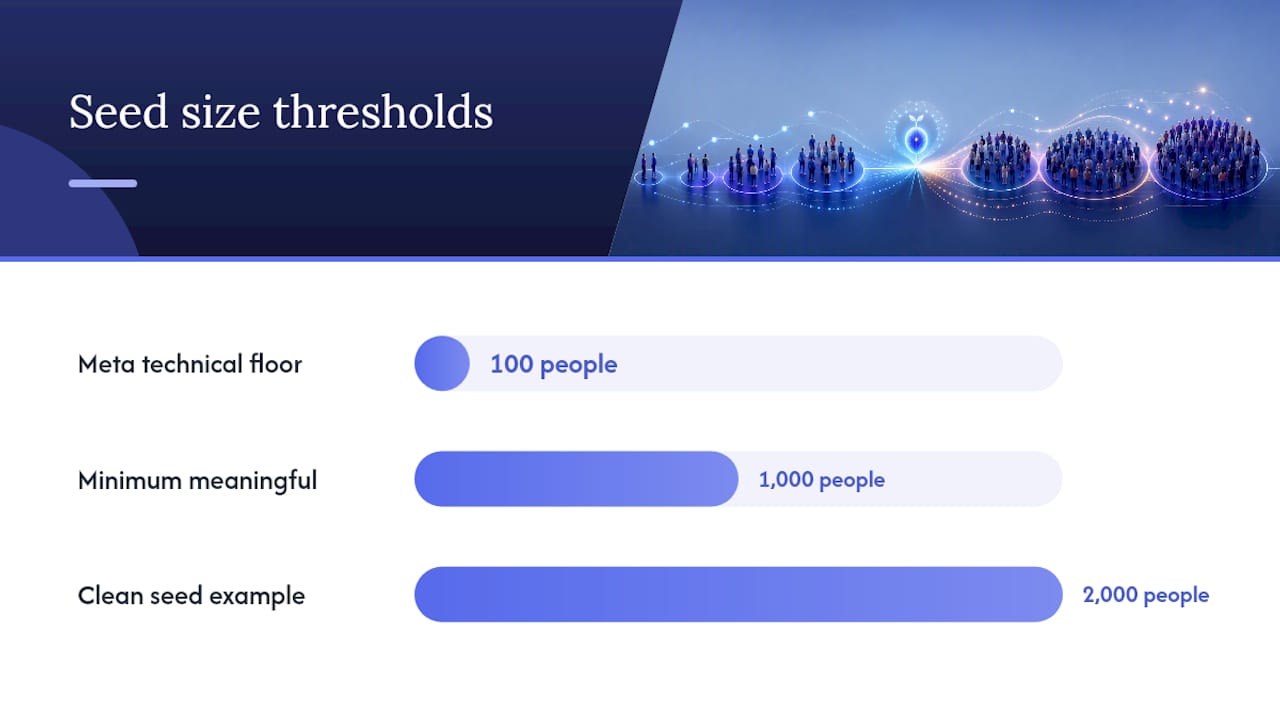
Statistic to know: Meta documents a technical floor of just 100 people from the same country to build a lookalike, but that number is a technical minimum, not a practical one. Most accounts need a seed well into the thousands before the model has enough pattern to work with reliably.
From what I’ve seen managing paid social for ecommerce brands, a few scenarios still favor manual lookalikes over Advantage+:
- Accounts running on offline or CRM-only data that never touches the Meta pixel directly
- New market entries where the account has no conversion history at all inside Meta
- Value-weighted seed lists where you specifically want delivery skewed toward your highest-LTV segment, not just “anyone who converts”
- Lower-volume accounts, where Advantage+'s appetite for conversion signal simply isn’t fed enough to expand intelligently
The rule of thumb I use with my team at Cosma: the richer your first-party signal, the more Advantage+ earns its keep. The thinner or more specialized your signal, the more a manual lookalike deserves a seat in the account.
Building a Seed That’s Actually Worth Modeling
Seed quality beats seed size almost every time. A clean list of 2,000 repeat purchasers will usually outperform a messy list of 50,000 people who visited your site once, according to practitioner consensus on lookalike modeling. Meta’s model is only as good as the pattern you hand it, and a noisy seed teaches it the wrong pattern.
Rank your signal sources like this before picking a seed:
- Repeat or high-LTV purchasers — your strongest, most predictive signal, especially with a value column attached
- Conversion events like add-to-cart or checkout-initiated — a solid second tier when purchase volume alone is too thin
- Engaged viewers, meaning people who watched a meaningful chunk of your video content or interacted with your Instagram or Facebook page
- General page engagers — the weakest tier, useful only when nothing stronger exists yet
Value-based lookalikes take this further by attaching an actual dollar figure to each customer in your uploaded list. Meta weights the model toward your highest-value customers instead of treating a $12 one-time buyer the same as a $400 repeat customer. For ecommerce brands with wide variance in customer value, this is one of the highest-leverage moves available, and practitioners consistently report it outperforming flat purchaser lists.
On minimums: Meta’s technical floor is 100 people, but I don’t recommend building anything meaningful below 1,000, and I’d rather see several thousand when the seed allows it. When uploading a customer list, match on multiple keys (email, phone, and name) rather than just one; thin match keys mean Meta can’t confidently tie your records to real accounts, which quietly shrinks your effective seed.
Pro Tip: Before building any lookalike from a CSV, check your Conversions API event match quality score in Events Manager first. A weak CAPI setup silently degrades your seed data, and you’ll never see the warning; you’ll just see a lookalike that underperforms for reasons that look like “bad luck.”
Conversions API matters more now than it did a few years ago because browser tracking restrictions strip out events that would otherwise feed your seed. CAPI recovers server-side signal that the browser alone can’t reliably send, which means your seed audience reflects more of what’s actually happening on your site, not just what a cookie happened to catch.
Creating a Lookalike in Ads Manager, Step by Step
Building the audience itself takes a few minutes. Getting it ready to actually run a campaign against takes a bit more patience.
- Go to Audiences inside Ads Manager and select Create Audience > Lookalike Audience.
- Choose your source: a Custom Audience built from your pixel, a customer list upload, or an engagement audience from Instagram or Facebook.
- Select your target country. You can only build a lookalike for one country per audience, so plan separate audiences for each market you’re targeting.
- Set your size, from 1% to 10%, based on the tradeoff between precision and reach discussed above.
- Add exclusions if this lookalike will run alongside retargeting or other lookalike audiences, to avoid audience overlap inside the same ad set structure.
- Name it clearly, including source, country, and percentage (something like “LAL 2% US, Repeat Purchasers, Feb 2026”) so you’re not guessing six months later.
- Click Create Audience and wait for population.
Meta typically populates a new lookalike within a few hours, though it can take longer depending on seed size and complexity, and it refreshes automatically as your seed updates if you’re using a pixel-connected or CAPI-fed source rather than a static upload. Don’t launch a campaign against a lookalike until its status shows “Ready” in Ads Manager. Launching early means your ad set is delivering against an incomplete or unstable audience, and your early performance data will be misleading.
One structural note that trips up a lot of accounts: a pixel-based lookalike auto-updates as new conversions roll in, which keeps it fresh without manual work. A static CSV upload doesn’t update itself at all; it’s frozen the moment you create it, and it will decay exactly the way any stale dataset does.
Testing Lookalikes Without Burning Your Budget
The mistake I see most often isn’t picking the wrong percentage. It’s testing lookalikes without any structure, so nobody can say afterward whether the audience actually drove incremental results or just cannibalized the account’s existing auction.
A clean parallel test needs a few fixed variables. Run the lookalike against Advantage+ (or against another lookalike tier) with matching creative, identical budgets, and the same attribution window, ideally 7-day click, so you’re comparing apples to apples rather than one ad set getting a longer credit window than the other.
For stacking multiple percentage tiers, follow a deliberate progression instead of testing them all at once:
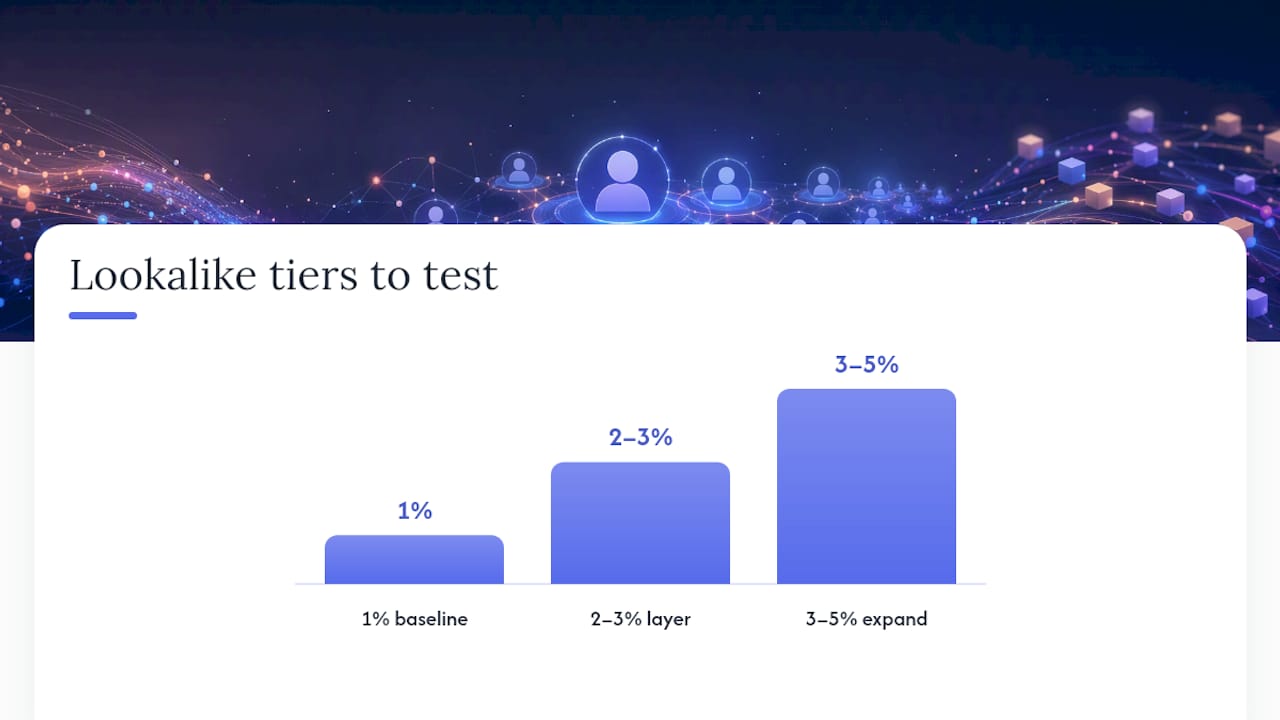
- Start with 1% to establish your tightest-match baseline
- Layer in 2% to 3% once the 1% tier has enough spend to read cleanly
- Expand to 3% to 5% only if the tighter tiers show fatigue or the account needs more volume than they can supply
Set mutual exclusions between each tier’s ad set so Meta isn’t bidding against itself for the same users across two audiences that overlap by definition.
Pro Tip: Give each test at least enough spend to clear the learning phase, roughly 50 optimization events per ad set within a week, before drawing conclusions. A lookalike that “underperforms” on day two is usually just an ad set still finding its footing, not a failed audience.
Track CPA, ROAS, CTR, and frequency side by side. Frequency creeping up fast while CPA holds steady usually signals a shrinking effective audience within that tier, a useful early warning before ROAS actually drops.
When a Lookalike Stops Working, and What to Do About It
Audience decay looks like rising CPA, climbing frequency, and a CTR that used to hold steady but is now sliding week over week. The tricky part is telling that apart from plain creative fatigue, which produces nearly identical symptoms.
The fastest diagnostic: swap in fresh creative against the same audience. If performance recovers, it was creative fatigue. If it stays flat or keeps declining, the audience itself has decayed, meaning the model has likely already reached most of the people in that percentage tier who resemble your seed closely enough to convert.
A few operational habits keep decay from sneaking up on you:
- Refresh static CSV uploads every 60 to 90 days if you’re not running them through the pixel or CAPI
- For pixel or CAPI-driven seeds, check volume and match quality monthly rather than assuming auto-refresh means “set it and forget it”
- When a tight percentage tier plateaus, step up incrementally, from 1% to 2%, then 3%, rather than jumping straight to 10% and losing precision all at once
- Pace budget increases gradually against a scaling lookalike; a sudden spend jump often outruns the audience’s actual size faster than performance data can warn you
If you’ve refreshed the seed, rotated creative, and stepped up the percentage tier and performance still isn’t recovering, that’s usually the signal to retire the lookalike for that segment and let Advantage+ take over instead. Fighting a genuinely exhausted audience rarely pays off compared to redirecting that budget toward automated expansion.
How I Actually Use Lookalikes in Client Accounts
At Cosma, the decision comes down to account archetype more than personal preference. Accounts with rich, consistent Meta conversion volume get pointed toward Advantage+ first, because the system has enough signal to work with and less manual overhead for my team to manage. Accounts running on CRM data, offline sales, or thin weekly conversion counts still get manual lookalikes, because that’s where control beats automation.
Three rules I hold to when building seeds and running tests: never seed with anything less than a few thousand real events when I can help it, always attach a value column when the customer base has real LTV variance, and never call a test result before it clears a real learning phase. Rushing that last one is the single most common reason teams misjudge a perfectly good audience as a failure.
— Stefano Mazzei
How My Team at Cosma Builds Lookalike Strategy for Ecommerce Brands
Getting a lookalike strategy right takes more than picking a percentage in Ads Manager. It takes clean first-party data, a creative testing rhythm that keeps pace with audience refreshes, and someone watching CAPI match quality before it quietly tanks your seed.

My team at Cosma builds and runs this process for DTC and ecommerce brands focusing on performance marketing, Meta Ads strategy, and creative testing following seed-quality principles. We also work with partners like Align when a brand needs broader strategic alignment across paid social channels beyond Meta. If you want to see how this plays out in real accounts, our case studies walk through the specifics. If you’d rather talk through your own account’s audience setup directly, you can book time with my team and we’ll dig into whether Advantage+, manual lookalikes, or a blend of both fits where your data actually stands today.
Sources
This piece draws on Meta’s own documentation for Lookalike Audiences and creating a Lookalike Audience, plus practitioner consensus on seed quality and value-based modeling. These sources back the specific claims made throughout.
FAQ
Does Meta still have lookalike audiences in 2026?
Yes. Lookalike Audiences remain a core targeting option inside Ads Manager, though Advantage+ Audience now handles a growing share of targeting decisions for accounts with rich conversion signal.
What is a lookalike audience in Meta ads?
A lookalike audience is a group of people Meta identifies as similar to a seed audience you provide, chosen from the top 1% to 10% of a target country based on shared behavioral and demographic patterns.
How do I set up a lookalike audience in Ads Manager?
Go to Audiences, select Create Audience, choose Lookalike Audience, then pick your source, target country, and size from 1% to 10% before naming and creating it.
What are the different types of Meta audiences?
Meta offers three main audience types: Custom Audiences built from your own data, Lookalike Audiences modeled from a seed, and Advantage+ Audience expansion, which uses AI-driven targeting with fewer manual constraints.
Should I use a value-based lookalike for my ecommerce store?
If your customer base has meaningful variance in order value or repeat purchase rate, a value-based lookalike, which weights the model toward your highest-value buyers, typically outperforms a flat purchaser list.


